
Unrandom Textures
Removes the random rotations from blocks introduced with 1.8's "Alternate Blocks" option and made permanent in 1.9.
I don't know my version or loader
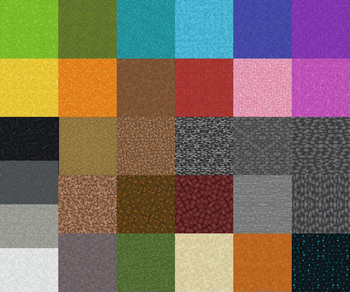
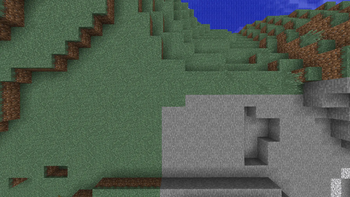
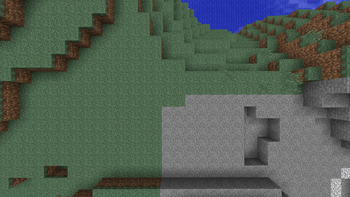
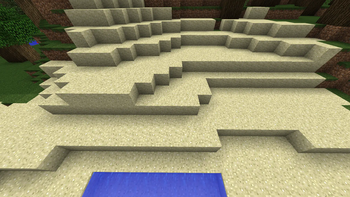
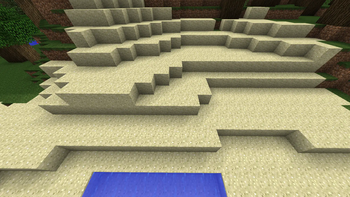
Minecraft version 1.8 added the "Alternate Blocks" setting which, when toggled on, gave certain blocks a random orientation. Minecraft 1.9 removed the option, making certain blocks always have a random orientation.
Thanks to resource packs, the previous non-random state for those blocks can be restored. Because this doesn't touch the textures directly, this is compatible with any resource pack that doesn't modify the block states.
If you're playing on a server and take screenshots, but have people decode the random block rotations to find and grief your build, this pack will hinder their ability to find your build. Note: this won't prevent users from decoding based on blocks this pack does NOT unrandomize (such as Lily Pads) nor natural features in the screenshot (such as where flowers spawn).
Pack version numbers coincide with format numbers for ease of tracking. Snapshots are not directly supported (in some cases, version numbers will skip to keep in line with format numbers). In most cases, you can use an existing pack with a different version. In my experience, Minecraft tends to deselect your resource packs that are out of date, but there are rarely changes that break using an older version with whichever version you are playing. Check the changelog for (known) breaking changes.
The blocks this pack affects are:
- bedrock
- black concrete powder
- blue concrete powder
- brown concrete powder
- cyan concrete powder
- deepslate
- dirt
- dirt path
- grass block
- gray concrete powder
- green concrete powder
- infested deepslate
- infested stone
- light blue concrete powder
- light gray concrete powder
- lime concrete powder
- magenta concrete powder
- mycelium
- netherrack
- orange concrete powder
- pink concrete powder
- podzol
- purple concrete powder
- red concrete powder
- red sand
- rooted dirt
- sand
- sculk
- stone
- white concrete powder
- yellow concrete powder
If you find an error in the pack, hop on my Discord and let me know about it.
If you see a block I missed, hop on my Discord and let me know about it.
(Discord link in sidebar)
- Edition: Minecraft Java
- File type: .zip (resource pack)
- Minecraft versions listed: 1.20, 1.20.1, 1.20.2
- How to install: Download the .zip resource pack — do not unzip it. → Put it in .minecraft/resourcepacks. → Enable it in Options → Resource Packs.
- Where to get it: Opens on Modrinth — not every file is mirrored on our own servers.
Install steps are the general flow for this file type — How to install Minecraft Java resource packs walks through it step by step.
- Downloads as Unrandom Textures v 15.11.0 - 1.20-1.21.11.zip
- Download size: 11 KB
- Download link checked 28 Aug 2026 — working
These come from our own check of the pack file, not from the source page.