


About
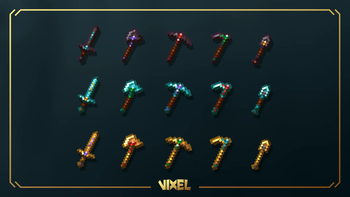
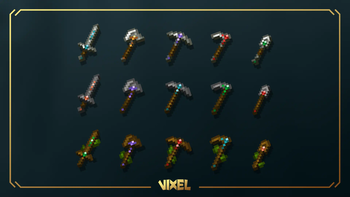
Re-texturing the default tools texture while adding trims using CIT feature from Optifine.
It is necessary to have Optifine (or Alternative Sodium Mods) installed for this pack to work properly.
How to Use
When using an anvil, you must include the name of the material you want to apply a trim to the tool.
•Netherite
•Diamond
•Gold
•Iron
•Emerald
•Redstone
•Lapis
•Amethyst
•Copper
•Quartz
These are the names of the materials you can use. The names are not case-sensitive and can be used anywhere at the beginning, middle, or end of the name.
LINKS

IMPORTANT
Warning!the only official sources for my projects are my Webpage(bento.me/vixel), PlanetMinecraft, Modrinth
Any other website claiming to offer my project for download is not official and may contain malicious files.
FAQ
- Is there a bedrock port?
There is no official bedrock port of any of my projects.
- Can i make a Bedrock port of your project ?
You are allowed to make a bedrock port as long as you follow license terms
but beware that it won't be considered as official port
- Pack version warning ?
There is a high chance that resource packs will work with different versions of Minecraft without the need to change the version of the pack, unless there is a major update that breaks resource packs, which you can report on Github.
- Edition: Minecraft Java
- File type: .zip (resource pack)
- Minecraft version listed: 1.21
- How to install: Download the .zip resource pack — do not unzip it. → Put it in .minecraft/resourcepacks. → Enable it in Options → Resource Packs.
- Where to get it: Opens on Modrinth — not every file is mirrored on our own servers.
Install steps are the general flow for this file type — How to install Minecraft Java resource packs walks through it step by step.
- Downloads as Tools&Trims_0.1.0.zip
- Download size: 435 KB
- Download link checked 28 Aug 2026 — working
These come from our own check of the pack file, not from the source page.