
Too Many Guns
I don't know my version or loader
Support Me


Showcase
Information
On the Versions tab, you can choose and download the individual texture packs for each gun model. If you just press the normal Download button, you will not be able to choose which gun model texture pack you download.
texture packs that replace the bow texture with various 3d gun models. also replaces arrows with bullets and changes bow and arrow sounds to gun sounds.
no naming items required! works on most multiplayer servers and single player.
most of the models are only available in 1.20/1.21, but the awp and desert eagle also have 1.8 versions.
TUTORIAL: how to change gun textureseach gun model has 2 different textures (all showcased in the video).
- first extract the .zip file.
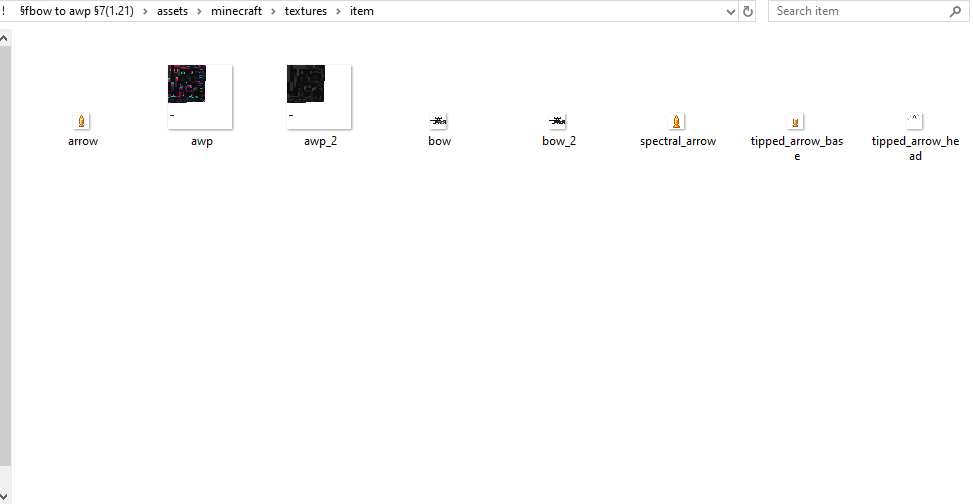
- open the pack folder and navigate to assets>minecraft>textures>item. the folder should look similar to the screenshot below.
- there are 2 different files named bow and 2 different files named awp (or whatever the name of the gun you are using is). the files without the "_2" at the end of their name are the textures that are used in-game, so to change textures just change the file names (for example, in the screenshot, rename awp to awp_2 and rename awp_2 to awp).
- reload your texture pack in-game and the texture will change
Public Usage
if you'd like to use assets/modified versions of this pack in your own projects and publicly share them, credit me and link this page or my YouTube video.
- as long as you credit me, you may use this pack or assets from this pack in your own public social media posts, mod packs, resource packs, and bedrock ports
- please do not create new showcase webpages, download links, or claim credit for making this pack or assets from this pack.
- if you are unsure, message me on discord (L33tfox) for permission
- Edition: Minecraft Java
- File type: .zip (resource pack)
- Minecraft versions listed: 1.20, 1.20.1, 1.20.2
- How to install: Download the .zip resource pack — do not unzip it. → Put it in .minecraft/resourcepacks. → Enable it in Options → Resource Packs.
- Where to get it: Opens on Modrinth — not every file is mirrored on our own servers.
Install steps are the general flow for this file type — How to install Minecraft Java resource packs walks through it step by step.
- Downloads as ! §fbow to usp-s §7(1.21).zip
- Download size: 533 KB
- Download link checked 28 Aug 2026 — working
These come from our own check of the pack file, not from the source page.