
ResourcepacksJava
Customizable Totem Plushie
Java resource pack listed for Minecraft 1.18–26.x. Downloads from the MC Java Mods app on Android.
⬇ Download on Modrinth
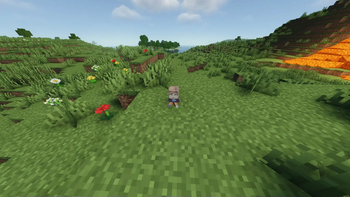
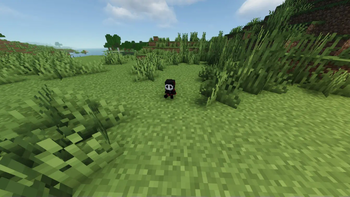
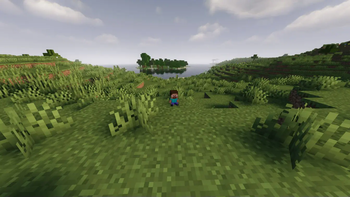
Customizable Totem Plushie is a resource pack that allows you to turn the totem of undying into a plushie of your skin easily!
This supports both wide and slim skins so don't worry about having to download a different version for different skins.
Does not require OptiFine or anything other mods!
The default totem skin is Steve, so you can use that if you want instead of your own.
How to turn the totem into your own plushie:
- Download the resource pack
- Inside the resource pack folder, go to assets/minecraft/textures/item
- Make sure you have a skin (you can get a skin from Skindex or NameMC if you don't have a skin)
- Delete the default Steve skin called steve (.png if you have file extensions enabled)
- Drag your skin into the folder
- Rename the skin to skin.png (Important: if you don't have file extensions enabled [so you can't see things like .png, .zip etc.] then just rename it to skin, not skin.png)
- Load the resource pack ingame, and you're done!
Enjoy!
Quick facts
- Edition: Minecraft Java
- File type: .zip (resource pack)
- Minecraft versions listed: 1.18, 1.18.1, 1.18.2
- How to install: Download the .zip resource pack — do not unzip it. → Put it in .minecraft/resourcepacks. → Enable it in Options → Resource Packs.
- Where to get it: Opens on Modrinth — not every file is mirrored on our own servers.
Install steps are the general flow for this file type — How to install Minecraft Java resource packs walks through it step by step.
File checked by MCModsHub
- Downloads as custom-totem-plush.zip
- Download size: 79 KB
- Download link checked 8 Oct 2026 — working
These come from our own check of the pack file, not from the source page.