
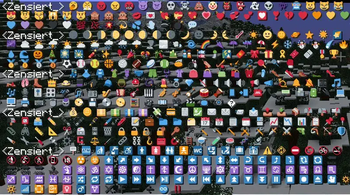
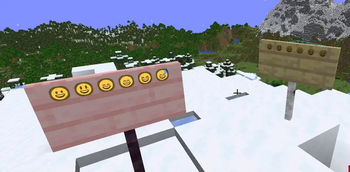
This Ressourcepack allows you to display most Emojis in Minecraft If you put Emojis on signs you will need to use white dye otherwise they won't display right due to how Minecraft displays it. Country flags and most Emojivariants won't work since they are made from multiple characters and Minecraft doesn't support that fully. These are the same Emoji Graphics used by Discord or Twitter
This Ressourcepack is based on the Twemoji Project twemoji.twitter.com/
All the images use to display Emojis are sourced from the Twemoji Project github.com/twitter/twemoji
Images are licensed under: creativecommons.org/licenses/by/4.0/
For Comments check out Planet Minecraft
- Edition: Minecraft Java
- File type: .zip (resource pack)
- Minecraft versions listed: 1.20.2, 1.20.3, 1.20.4
- How to install: Download the .zip resource pack — do not unzip it. → Put it in .minecraft/resourcepacks. → Enable it in Options → Resource Packs.
- Where to get it: Opens on Modrinth — not every file is mirrored on our own servers.
Install steps are the general flow for this file type — How to install Minecraft Java resource packs walks through it step by step.
- Downloads as twemoji.zip
- Download size: 1.4 MB
- Download link checked 28 Aug 2026 — working
These come from our own check of the pack file, not from the source page.