
Smooth Armor Textures
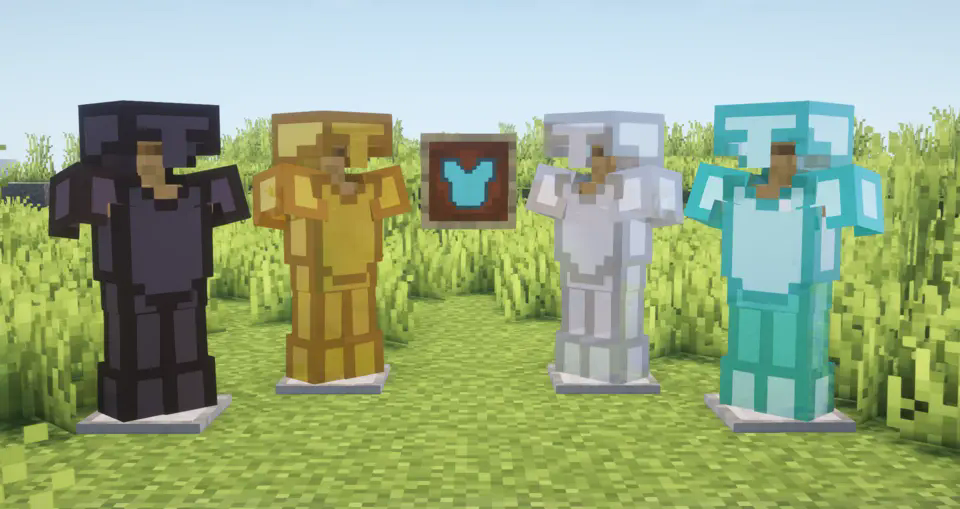
Features :
- Designed armor textures for a smoother, more PvP related appearance .
- Compatible with vanilla armor sets .
- Fully compatible with all resolutions (16x default)
- Perfect for medieval, fantasy, or clean-themed packs
Installation :
- Download the .zip file for the resource pack.
- Place it in your resourcepacks folder:
/.minecraft/resourcepacks/ - Launch Minecraft and activate the pack from the Resource Packs menu.
Compatibility :
- Minecraft Versions: 1.20+
- Works with OptiFine, Iris, Sodium and vanilla Minecraft
- No performance loss
Credits :
Shaders used in the screenshot: Complementary Shaders - Reimagined
Quick facts
- Edition: Minecraft Java
- File type: .zip (resource pack)
- Minecraft versions listed: 1.8, 1.8.1, 1.8.2
- How to install: Download the .zip resource pack — do not unzip it. → Put it in .minecraft/resourcepacks. → Enable it in Options → Resource Packs.
- Where to get it: Opens on Modrinth — not every file is mirrored on our own servers.
Install steps are the general flow for this file type — How to install Minecraft Java resource packs walks through it step by step.
Verified by MCModsHub
- Downloads as SmootherArmor.zip
- Download size: 17 KB
- Download link checked 28 Aug 2026 — working
These come from our own check of the pack file, not from the source page.