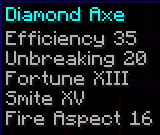
In Minecraft, there is a bug where if you get an enchantment with level higher than 10, it will show the level as enchantment.level.<level>; For example, If I get an axe with efficiency 15, smite 25, and unbreaking 10, it will show as efficiency enchantment.level.15, smite enchantment.level.25 and unbreaking X.
This texture pack fixes that. WIth this texture pack, level displays (both for potion effects and enchantments) will now cap out at level 255 instead of level 10 (level 6 for potion effects).
It also has support for roman numerals (numbers like V, X, IX, III), but only until level 15. after level 15, to avoid confusion, it will switch to regular numbers (numbers like 15, 29, 69, 50). It still caps out after level 255 though.
| Number | Without texture pack (Enchantments) | Without texture pack (Potions) | With texture pack (Enchantments) | With texture pack (Potions) |
|---|---|---|---|---|
| 1 | I | I | I | I |
| 6 | VI | VI | VI | VI |
| 9 | IX | potion.potency.8 | IX | IX |
| 10 | X | potion.potency.9 | X | X |
| 11 | enchantment.level.11 | potion.potency.10 | XI | XI |
| 14 | enchantment.level.14 | potion.potency.13 | XIV | XIV |
| 15 | enchantment.level.15 | potion.potency.14 | XV | XV |
| 16 | enchantment.level.16 | potion.potency.15 | 16 | 16 |
| 17 | enchantment.level.17 | potion.potency.16 | 17 | 17 |
| 25 | enchantment.level.25 | potion.potency.24 | 25 | 25 |
| 80 | enchantment.level.80 | potion.potency.79 | 80 | 80 |
| 150 | enchantment.level.150 | potion.potency.149 | 150 | 150 |
| 255 | enchantment.level.255 | potion.potency.254 | 255 | 255 |
| 256 | enchantment.level.256 | potion.potency.255 | enchantment.level.256 | 256 |
| 257 | enchantment.level.257 | potion.potency.256 | enchantment.level.257 | potion.potency.256 |
This work is licensed under CC BY-NC-ND.

One exception is made for video content, which can be monetized. However, you must give appropriate credit in the description of your video.
- Edition: Minecraft Java
- File type: .zip (resource pack)
- Minecraft versions listed: 1.6.1, 1.6.2, 1.6.4
- How to install: Download the .zip resource pack — do not unzip it. → Put it in .minecraft/resourcepacks. → Enable it in Options → Resource Packs.
- Where to get it: Opens on Modrinth — not every file is mirrored on our own servers.
Install steps are the general flow for this file type — How to install Minecraft Java resource packs walks through it step by step.
- Downloads as Better Numerical Displays v1.0.0.zip
- Download size: 28 KB
- Download link checked 28 Aug 2026 — working
These come from our own check of the pack file, not from the source page.