
Vanilla Changes
Java resource pack listed for Minecraft 1.21–26.x. Downloads from the MC Java Mods app on Android.
A subtle enhancement pack that stays true to Minecraft’s original look. Cleaner visuals, better consistency, and small details that feel naturally vanilla.
I don't know my version or loader



✨ Vanilla Changes: A Clean and Elevated Minecraft Experience
Vanilla Changes is a meticulously designed resource pack that delivers subtle but precise improvements to Minecraft’s visuals. It stays fully aligned with the original art style, refining details without altering the core identity. Every texture and adjustment is crafted to merge seamlessly with the default look, preserving the charm players expect.
From cleaner items to clearer GUI's and small visual refinements that enhance your gameplay, Vanilla Changes elevates the experience without ever drawing attention to itself. It does not try to reinvent Minecraft; it improves what already works.
The pack is also structured with creators in mind. Assets are consistently named, neatly organized, and easy to navigate, allowing developers to adapt or extend the pack with minimal effort. It is built to be understood, modified, and expanded with confidence.
❓ Why Vanilla Changes?
Unlike most packs, this one delivers refinement without unnecessary additions. It is made for players who appreciate the vanilla style and want it presented at its highest quality. Vanilla Changes does not attempt to correct Minecraft’s aesthetic; it elevates what already works and adds a few tasteful improvements where they matter. The pack is also built for longevity, with a structure that allows fast updates so you can rely on using it on the latest Minecraft versions with minimal delay.
🎉 What's New?
This pack introduces:
- Visual refinements that elevate the original style without distracting from it.
- Quality-of-life features that make the game feel smoother and more enjoyable.
- Modernized textures that remain faithful to Vanilla while offering a cleaner presentation.
- Selective new elements such as fractured tools, expanding the game’s visual identity without breaking it.
🧩 Compatibility & Notes
- ✅ Minecraft Versions: 1.21.5+
- ⚙️ Optional Mods: Some features require mods (see table below)
- ⚠️ May conflict with resourcepacks that alter:
- Chests, beds, arrows, consumables, bows/crossbows and/or tools.
🔧 Recommended Mods
| Mod | Purpose | OptiFine Equivalent |
|---|---|---|
| Continuity | Emissive/Connected textures | 🟢 Yes |
| ETF | Random entity/item textures | 🟡 Partial |
| EMF | 3D models on entities | 🟡 Partial |
| Puzzle | Custom loading screen | 🟡 Partial |
| OptiGUI | Unique GUI designs | 🟡 Partial |
| Skyboxify | Custom Sky | 🟢 Yes |
| Polytone | Custom Sky and Fog | 🔴 No |
🟢 = Fully replaceable
🟡 = Partially replaceable
🔴 = Not replaceable
Discord 🔵
For developer updates, infos, known issues or if you need help, it is recommend to join the Vanilla Lab Discord server.

See Gallery for example images.
Features marked with "*" do not have images. Some images are currently outdated but new ones are coming soon!
Features
| Feature | Requirements | Description |
|---|---|---|
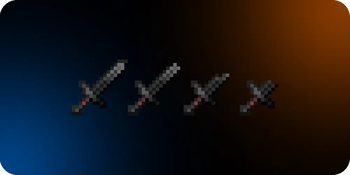
| ⛓️💥 Fractured Tools | None | Tools will visually Change their texture when they are about to break |
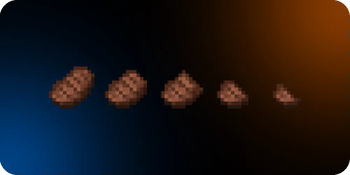
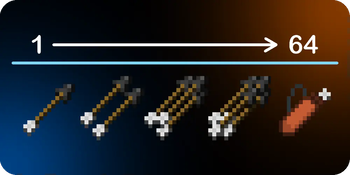
| 📈 Visual Stack size | None | Depending on the stack size, some items will reflect the amount in their texture |
| 📔 Enchantment Icons | None | Every enchantment will feature a unique icon in thier name. |
| 🧱 Connected Textures | Continuity | Connects Textures from blocks for a more natural look |
| 📚 Unique Enchanted Books | None | Unique textures for every enchanted book depending on the Enchantment and level |
| 🍗 Eating & Drinking Animations | None | When Eating or Drinking, the texture changes over time |
| 📼 Custom Loading Screen | Puzzle | Gives the Loading screen a better look |
| 🔳 3D Blocks | None | Gives some blocks more depth and detail with 3D Models |
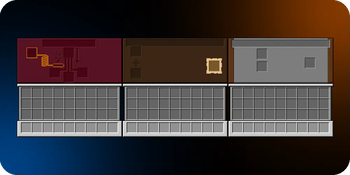
| 🖥️ GUI Overhaul | Optional: OptiGUI | Gives every container a unique texture |
| 🌄 Custom Panorama | None | A beautiful new Panorama |
| 📃 Custom Font | None | A new font that is probably more fitting to the game than the vanilla font |
| 💡 Emissive Textures | Continuity | Some blocks now have Emessive/Glowing parts that makes them more immersive |
| 🔊 Custom Sounds* | None | Added some new sounds to make the game sound better |
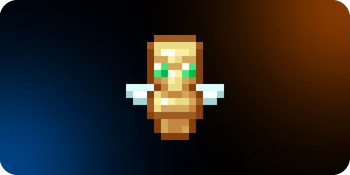
| 🧸 Small Custom Totem | None | A smaller totem that does not take up your screen |
| 🛡️ Side-Held and Lower Shield | None | A better way of holding your shield |
| 🎊 Colored Text* | None | It just makes some menus look better |
| 🍃 Biome specific creeper textures* | ETF | To make creepers blend in |
Add-ons
All Addons require the Base Pack to be installed
Where can I find the Add-ons?Add-ons are the only versions marked as Alpha. Their naming follows a strict format;
What does the Version Number mean?
Add-ons always use this structure:
Add-on-[version number]
Example: Add-on-V3.2
The version number of an add-on always matches the Base Pack version it is designed for.
If the base pack is V3.2, the add-on will also be V3.2.
How do I tell different add-ons apart?
Each add-on includes a clear name showing what it adds/changes:
Add-on: [add-on name]
Example: Add-on: Dark GUI
| Add-on | Description |
|---|---|
| ⬛ Dark GUI | Makes every GUI element darker |
| 🎄 XMas GUI | Adds some Christmas elements to the GUI |
...and a lot more!
Icons and Colored text are only available in the following supported languages:
- English (US, GB, AU, CA, NZ)
- Deutsch (DE)
...more languages soon!

| Mod | GUI Support | Other | Complete | Supported by VC version: |
|---|---|---|---|---|
| Mod Menu | 🟢 Full | None | ✅ Yes | V1+ |
| Simple Voice Chat | 🟢 Full | Semi-Transparent Icons | ✅ Yes | V0.9+ |
| Inventory Profiles Next | 🟢 Full | None | ✅ Yes | V1+ |
| AppleSkin | 🟢 Full | None | ✅ Yes | V0.6+ |
| Enchanting Infuser | 🟡 Raw | None | ❌ No | V1.7 - V3.2 |
| Easy Anvils | 🟡 Raw | None | ❌ No | V1.7 - V3.2 |
| Easy Magic | 🟡 Raw | None | ❌ No | V1.7 - V3.2 |
| Tom's Simple Storage Mod | 🟢 Full | None | ✅ Yes | V1.7 - V3.2 |
| Traveler's Backpack | 🟡 Raw | None | ❌ No | V2.1 - V3.2 |
| Tradye Cycling | 🟢 Full | None | ✅ Yes | V2.2+ |
| Soulbound Enchantment | N/A | Custom Book Texture, Colored Enchantment name, Enchantment Icon | ✅ Yes | V2.2.1+ |
| Veinminer Enchantment | N/A | Custom Book Texture, Colored Enchantment Name, Enchantment Icon | ✅ Yes | V2.1+ |
| Cubes Without Borders | N/A | Colored text | ✅ Yes | V3.0.2+ |
| Client Sort | 🟢 Full | None | ✅ Yes | P1-4.0+ |
| Axiom | 🟢 Full | None | ✅ Yes | V4.0+ |
If it says, that support for a mod is "Complete", it means that the latest Vanilla Changes version that supports it has fully developed assets for the mod
🟢 = Fully Supported
🟡 = A "raw" Version of it
🔴 = No changes made
N/A = Nothing to change

📜 License & Attribution
This pack is licensed under CC-BY-NC-SA-4.0.
You're free to use it in your projects, modpacks or servers.
If you feature it, please:
- Credit this page
- Don’t monetize it
- Share your creation under any CC-SA licence
- Respect the terms of the creators that are mentioned in the credits (inspirations excluded)
CREDITS:
Pack Owner - Vanilla Lab:
Just_Syrexx
Mtf_mo
Novacraft
Noxii
Some 3D Blocks:
UnduGT - Modrinth
Visual: Armor Trims:
thanos - Modrinth
Important Assets:
Inspirations:
Aukasz - Simply Trims - Modrinth
RobotPants - Bare Bones (Widgets, Hotbar) - Modrinth/Curseforge
theoness1 - Eating Animation - Modrinth/Curseforge
xalixilax - xali's Enchanted Books - Modrinth/Curseforge
Voxel1 - Voxel1's Immersive items - Modrinth
CountXD - Enchant Icons - Modrinth/Curseforge
Special Thanks:
Everyone who downloaded this pack ❤️
💬 Transparency Note
We are not native English speakers. If you notice any grammar mistakes, typos, or missing attributions, please let us know and we will correct them promptly. We are committed to continuous improvement.
All promotional materials and images for Vanilla Changes featured on this page that were created and uploaded by Syrexx are the intellectual property of the author. Unless otherwise stated, they are licensed under the CC-BY-NC-SA-4.0 license.
AI Notice
We kinda feel the need to talk about AI usage in our projects. We are against using AI in creative projects, no matter what kind of creativity lies in said project.
While we are using AI, for correcting grammar mistakes on this Modrinth page, we are never using AI in any shape or form in the projects itself or for generating any images, texts or sounds.
Or in other words:
- Fixing our bad english? -> Yes
- Doing literally anything alse? -> Never
Developing updates for Minecraft projects take time for a reason. Minecraft is an incredibly complex sandbox with near endless possibilities, meaning features need to be tested across many different scenarios to ensure they work as expected. This process alone is time consuming but essential for a stable experience.
Beyond that, development is not just implementation, it also involves designing and refining ideas. Creating features that feel polished and well integrated takes time, especially when aiming for a high standard.
We also have real life responsibilities that limit the time we can dedicate to these projects.
We are also doing this without any compensation meaning that this is not a job but a hobby and we are happy that this is the case.
In the end, we prioritize quality over quantity. We would rather release fewer, well made updates than frequent, unpolished ones.
We are not Ubisoft or EA
© 2025-2026 Syrexx ∘ CC-BY-NC-SA-4.0
- Edition: Minecraft Java
- File type: .zip (resource pack)
- Minecraft versions listed: 1.21.3, 1.21.4, 1.21.5
- How to install: Download the .zip resource pack — do not unzip it. → Put it in .minecraft/resourcepacks. → Enable it in Options → Resource Packs.
- Where to get it: Opens on Modrinth — not every file is mirrored on our own servers.
Install steps are the general flow for this file type — How to install Minecraft Java resource packs walks through it step by step.
- Downloads as §6Vanilla §9Changes§8.zip
- Download size: 28.3 MB
- Download link checked 9 Oct 2026 — working
These come from our own check of the pack file, not from the source page.