
Potion Effect Indicators
Java resource pack listed for Minecraft 1.21–26.x. Downloads from the MC Java Mods app on Android.
Potions now show a visual indicator of whether the effect has been strengthened or extended through brewing in the bottom left! Great for PvP and casual…
⬇ Download on Modrinth

Potions now show the whether the effect has been strengthened or extended through brewing in the bottom left of the texture! This applies to all potions, including splash potions, lingering potions and ominous bottles. The pack includes a potion drinking animation too! Great for PvP and casual gameplay!
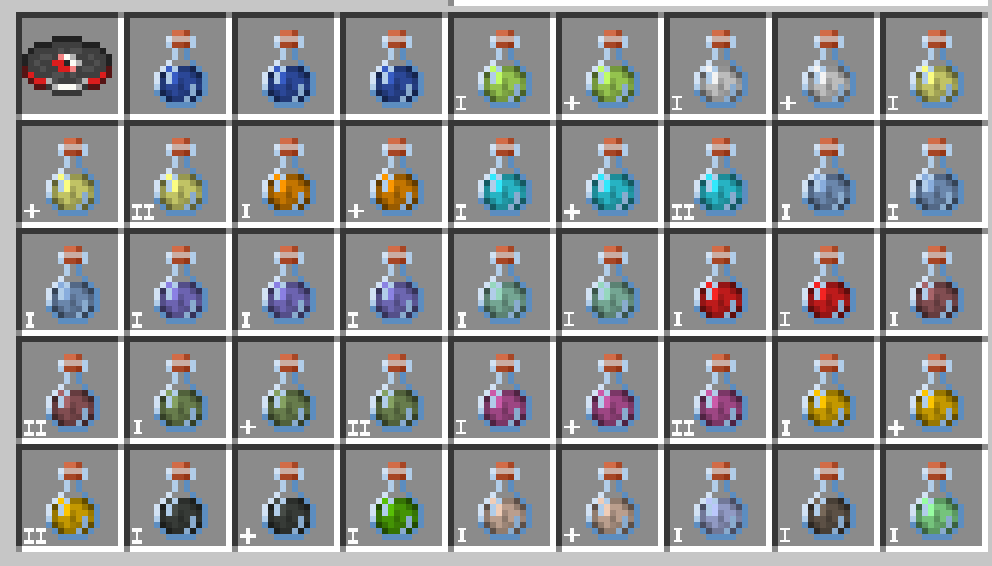
I means the potion effect is the default length (3 minutes) and the effect has not been strengthened or extended by brewing.
II means the potion effect has been strengthened by brewing the potion with a piece of glowstone dust (for example, Strength I becomes Strength II).
The + means the length of the potion effect has been extended by brewing the potion with a piece of redstone dust (for example, Strength I for 3 minutes becomes Strength II for 8 minutes).
Please report any bugs to me on discord
Thanks Bluebird for letting me include the potion drinking animation from their Eating Animation Resource Pack!
https://modrinth.com/user/Bluebird
https://modrinth.com/resourcepack/eating-animation-resource-pack
Made by MrNoodleStroodle
- Edition: Minecraft Java
- File type: .zip (resource pack)
- Minecraft versions listed: 1.21.5, 1.21.6, 1.21.7
- How to install: Download the .zip resource pack — do not unzip it. → Put it in .minecraft/resourcepacks. → Enable it in Options → Resource Packs.
- Where to get it: Opens on Modrinth — not every file is mirrored on our own servers.
Install steps are the general flow for this file type — How to install Minecraft Java resource packs walks through it step by step.
- Downloads as Potion Effect Indicators v1.1.zip
- Download size: 113 KB
- Download link checked 9 Oct 2026 — working
These come from our own check of the pack file, not from the source page.