
【MTR3/4】JR西日本207系1000番台|JR West 207-1000 Series
MTR(Minecraft Transit Railway)にJR西日本207系1000番台を追加します。 This resource pack adds the JR West 207-1000 Series to the MTR (Minecraft Transit Railway)!
I don't know my version or loader
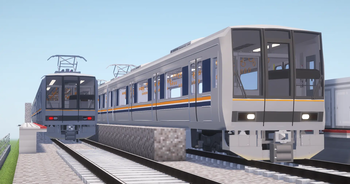
このリソースパックは、日本のJR西日本207系1000番台を追加します。
Wikipediaリンク/Wikipedia Link:JR西日本207系電車
注意
このリソースパックはJR西日本と何ら関係がなく、JR西日本の公式製品でもありません。 ご注意下さい。 objファイルを使用しているので、NTE(Nemo's Transit Expansion)も導入してください。 リンク: https://modrinth.com/mod/mtr-nte
[インストール手順]
- 起動設定のresourcepacksフォルダにzipを入れ、マイクラの設定から「リソースパック...」を押し、選択して適応させます。
- ダッシュボードから車両基地の線路を選択し、JR西日本 207系1000番台の「2両Y編成」「3両S編成」「4両T編成」「6両X編成」「3+4両 S+T編成」から好きな車両を選択します。MTR4の場合は、「Tc(front_cab)」「Tc_転落防止幌(front_cab_with_barrier)」「M(trailer_with_pantograph)」「T(trailer)」「Mc(back_cab)」「Mc_転落防止幌(back_cab_with_barrier)」から編成を作成します。
- 車両が見えたら成功です!
This resource pack adds the JR West 207-1000 series in Japan.
Wikipedia Link: 207 series (JR West)
Note
This resource pack is not affiliated with JR West in any way and is not an official JR West product. Please note. Since this uses obj files, please also install NTE (Nemo's Transit Expansion). Link: https://modrinth.com/mod/mtr-nte
[Installation Instructions]
- Place the zip file in the resourcepacks folder in the startup settings, then press “Resource Packs...” in Minecraft settings, select it, and apply.
- Select the vehicle depot tracks from the dashboard, then choose your preferred vehicle from JR西日本 207系1000番台 "2両Y編成" "3両S編成" "4両T編成" "6両X編成" "3+4両 S+T編成". For MTR4, create formations from "Tc(front_cab)" "Tc_転落防止幌(front_cab_with_barrier)" "M(trailer_with_pantograph)" "T(trailer)" "Mc(back_cab)" "Mc_転落防止幌(back_cab_with_barrier)"
- If the vehicle appears, installation was successful!
- Edition: Minecraft Java
- File type: .zip (resource pack)
- Minecraft versions listed: 1.17.1, 1.18.2, 1.19.2
- How to install: Download the .zip resource pack — do not unzip it. → Put it in .minecraft/resourcepacks. → Enable it in Options → Resource Packs.
- Where to get it: Opens on Modrinth — not every file is mirrored on our own servers.
Install steps are the general flow for this file type — How to install Minecraft Java resource packs walks through it step by step.
- Downloads as JRW-207-1000_MTR4.zip
- Download size: 3.5 MB
- Download link checked 28 Aug 2026 — working
These come from our own check of the pack file, not from the source page.