
ResourcepacksJava
Enchant Description
A clean and polished enchantment description format you can use for both Vanilla and Enchant Plus enchantments.
⬇ Download on Modrinth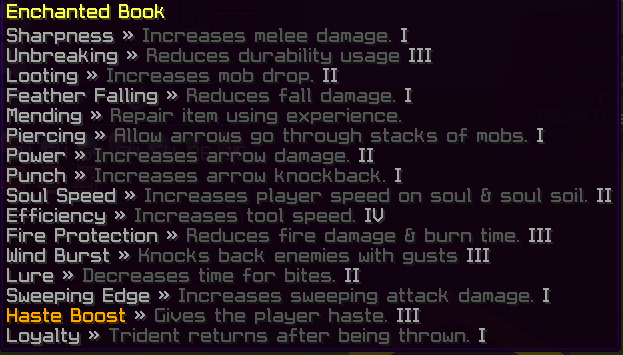

A simple and clean resource pack that adds detailed descriptions to all enchantments in Minecraft including both vanilla and custom (Enchant Plus) ones.
📘 Features:
- Shows tooltip descriptions for each enchantment.
- Support Enchant format upto 256 levels.
- Supports vanilla enchantments like Sharpness, Unbreaking, etc.
- Adds support for Enchant Plus custom enchants.
- No mods or datapacks required just drop into
resourcepacks/.
💡 Example Tooltip:
Mending >> Repair Item Using experience.
Sharpness >> Increase Melee Damage. V
Looting >> Increase Mob Drop Loot. III
- Place the
.zipin your Minecraftresourcepacksfolder. - Enable the pack in the Resource Packs menu.
- Done! Hover over an enchanted item to see the magic.


Looking for a better, cleaner Minecraft launcher?
Check out Cubi Launcher a modern, feature-rich launcher with a polished UI, and it's completely free to use. Download Now↗

Quick facts
- Edition: Minecraft Java
- File type: .zip (resource pack)
- Minecraft versions listed: 1.16, 1.16.1, 1.16.2
- How to install: Download the .zip resource pack — do not unzip it. → Put it in .minecraft/resourcepacks. → Enable it in Options → Resource Packs.
- Where to get it: Opens on Modrinth — not every file is mirrored on our own servers.
Install steps are the general flow for this file type — How to install Minecraft Java resource packs walks through it step by step.
Verified by MCModsHub
- Downloads as Enchant Description.zip
- Download size: 7 KB
- Download link checked 28 Aug 2026 — working
These come from our own check of the pack file, not from the source page.