
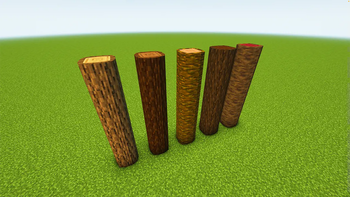
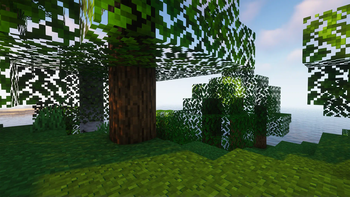
Do you ever wish that Minecraft's logs were rounder? Well, this pack is the answer to your question!
What? 🤔
Makes vanilla logs look rounder. 🟤
How 🤷♂️
By applying a different model to logs through a resource pack.
Help! My logs aren't round! 😫
You may have made one of two mistakes or a misconception.
You didn't install the pack correctly, watch this video on how if you don't understand - https://www.youtube.com/watch?v=X3idBsCTNio
You may need to reload your game or you have a pack overriding this one, to reload the game while in a world, press
F3 +T, and make sure that this pack is at the top of your resource pack list.You thought the logs were going to look like perfect circles. No, this is Minecraft so the logs are still low poly.
Help! Only some logs are round! 😩
This pack only makes logs that are vertical (Like the ones in trees) round that way when you place a horizontal log next to a vertical one, they will fit together instead of looking broken.
- Edition: Minecraft Java
- File type: .zip (resource pack)
- Minecraft versions listed: 1.13.1, 1.13.2, 1.14
- How to install: Download the .zip resource pack — do not unzip it. → Put it in .minecraft/resourcepacks. → Enable it in Options → Resource Packs.
- Where to get it: Opens on Modrinth — not every file is mirrored on our own servers.
Install steps are the general flow for this file type — How to install Minecraft Java resource packs walks through it step by step.
- Downloads as EMP's Rounded Logs.zip
- Download size: 178 KB
- Download link checked 28 Aug 2026 — working
These come from our own check of the pack file, not from the source page.