
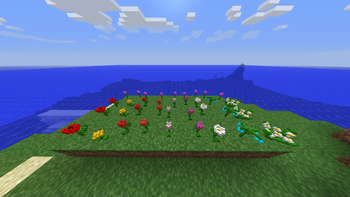

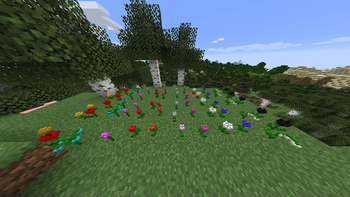
Сreate your perfect garden
This resource pack changes the model from 2D to 3D Flowers such as:
- Allium
- Oxeye Daisy
- Dandelion
- Poppy
- Blue Orchid
- Azure Bluet
- Red Tulip
- Orange Tulip
- White Tulip
- Pink Tulip
- Cornflower
- Lily of the valley
- Wither rose (The list will be updated with updates)
INSTALLATION:
- Download this resource pack.
- Move the .zip file to your resourcepacks folder.
- Launch Minecraft and select the resource pack in the settings menu.
Quick facts
- Edition: Minecraft Java
- File type: .zip (resource pack)
- Minecraft version listed: 1.21.4
- How to install: Download the .zip resource pack — do not unzip it. → Put it in .minecraft/resourcepacks. → Enable it in Options → Resource Packs.
- Where to get it: Opens on Modrinth — not every file is mirrored on our own servers.
Install steps are the general flow for this file type — How to install Minecraft Java resource packs walks through it step by step.
Verified by MCModsHub
- Downloads as 3D_Flowers_1.21.4_0.1.0.zip
- Download size: 171 KB
- Download link checked 19 Sept 2026 — working
These come from our own check of the pack file, not from the source page.