
Plastic+
I don't know my version or loader
Fullpack from 1.0.0 to 1.21.X will take time.
About:
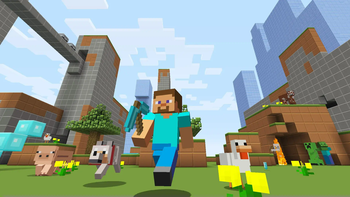
Plastic+ is a continuation of the Legacy Console Edition Plastic texture pack, preserving its original simplistic design and bright colours.
This pack adds plastic-themed textures to blocks, items, entities and the UI.
Originally created by 4J for the Legacy Console edition.
How to install:
On Modrinth App simply click the "Install" or "Add to an instance" button.
For Minecraft 1.5.2 and below:
- Download Plastic+
- Go to %appdata%
- Copy .zip to /Roaming/.minecraft/texturepacks
- Launch Minecraft and select Plastic+
For Minecraft 1.6.1 and above:
- Download Plastic+
- Go to %appdata%
- Copy .zip to /Roaming/.minecraft/resourcepacks
- Launch Minecraft and select Plastic+
Mods supported::
N/A
FAQ:
Can I use this in a video/modpack?
Yes just credit me.
Any issues?
Let us know in the Discord
NOTE: This pack is still being updated (I forgot about it but im back). So be sure to download the latest version for bug fixes.
- Edition: Minecraft Java
- File type: .zip (resource pack)
- Minecraft versions listed: 1.2.1, 1.2.2, 1.2.3
- How to install: Download the .zip resource pack — do not unzip it. → Put it in .minecraft/resourcepacks. → Enable it in Options → Resource Packs.
- Where to get it: Opens on Modrinth — not every file is mirrored on our own servers.
Install steps are the general flow for this file type — How to install Minecraft Java resource packs walks through it step by step.
- Downloads as Plastic+ 1.2.X.zip
- Download size: 751 KB
- Download link checked 19 Sept 2026 — working
These come from our own check of the pack file, not from the source page.