
ResourcepacksJava
Black Red Gui
Java resource pack listed for Minecraft 1.19–26.x. Downloads from the MC Java Mods app on Android.
Black & Red GUI Black & Red GUI gives Minecraft a bold, high-contrast interface makeover with deep blacks and sharp red accents. Perfect for players who…
⬇ Download on Modrinth
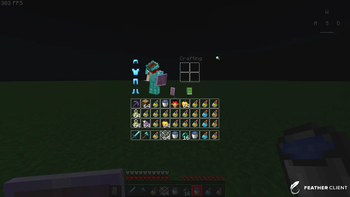
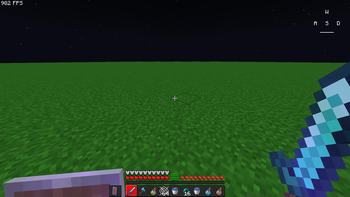
Black & Red GUI
Black & Red GUI gives Minecraft a bold, high-contrast interface makeover with deep blacks and sharp red accents.
Perfect for players who want a modern, aggressive look without losing menu clarity.
🎨 Features
- Dark Black Backgrounds for menus, buttons, and widgets
- Crimson Red Highlights for selectors, hover effects, and indicators
- Clean, minimal design that stays readable in all game modes
- Lightweight & FPS-friendly — no performance loss
💾 Drop it in your resourcepacks folder, enable it, and enjoy the fresh new look.
Quick facts
- Edition: Minecraft Java
- File type: .zip (resource pack)
- Minecraft versions listed: 1.19, 1.19.1, 1.19.2
- How to install: Download the .zip resource pack — do not unzip it. → Put it in .minecraft/resourcepacks. → Enable it in Options → Resource Packs.
- Where to get it: Opens on Modrinth — not every file is mirrored on our own servers.
Install steps are the general flow for this file type — How to install Minecraft Java resource packs walks through it step by step.
File checked by MCModsHub
- Downloads as Red - Black GUI.zip
- Download size: 562 KB
- Download link checked 9 Oct 2026 — working
These come from our own check of the pack file, not from the source page.