
Netherite Armor
I don't know my version or loader
⚔️ Netherite Armor – Minecraft Resource Pack
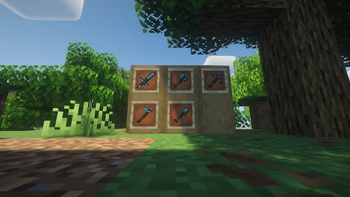
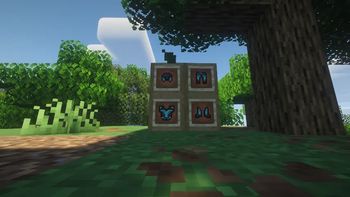
Netherite Armor is a visual texture pack that completely reworks Netherite armor in Minecraft.
It replaces the default armor textures with a darker, more detailed, and more immersive version.
⸻
🛠️Features
🎨 Custom textures for the complete Netherite armor set: helmet, chestplate, leggings, and boots
🧍 Visual modifications only — no impact on gameplay
💻 Fully compatible with vanilla Minecraft
🔁 Lightweight and easy to install
⸻
📥How to install
Download the .zip file
Place it in your .minecraft/resourcepacks folder
Launch Minecraft and activate the pack in the "Resource Packs" menu
Press F3 + T to reload the textures if necessary
⸻
✅ Compatibility
Version: Minecraft Java Works with or without OptiFine
Ideal for all game modes: survival, creative, role-playing, etc.
⸻
❓ Why download it?
To give Minecraft's most powerful armor a unique visual identity
For a more immersive and polished look
To personalize your gameplay experience without changing the mechanics
Because your armor deserves to be epic 🔥
⸻
💬 Found a bug or have a suggestion?
Feel free to leave a comment 💬 Reddit discussion: share your comments, ideas, and suggestions for future updates! Your feedback is always welcome!
⸻
🧡 Thank you for using Netherite armor and happy gaming!
- Edition: Minecraft Java
- File type: .zip (resource pack)
- Minecraft versions listed: 1.21.9, 1.21.10
- How to install: Download the .zip resource pack — do not unzip it. → Put it in .minecraft/resourcepacks. → Enable it in Options → Resource Packs.
- Where to get it: Opens on Modrinth — not every file is mirrored on our own servers.
Install steps are the general flow for this file type — How to install Minecraft Java resource packs walks through it step by step.
- Downloads as NetheriteArmor.zip
- Download size: 24 KB
- Download link checked 29 Aug 2026 — working
These come from our own check of the pack file, not from the source page.