
Roboto Regular
Java resource pack listed for Minecraft 1.21–26.x. Downloads from the MC Java Mods app on Android.
I don't know my version or loader
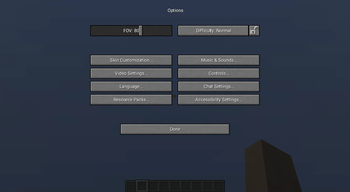
This resource pack changes your Minecraft font to an higher quality one across all menus. It is compatible with all languages the default font is, aka not many Asian languages. You can use this along with any other resource pack, just move it to the top in activated resource packs' order.
Looking for the bold version? Click here.
Looking for Product Sans? Here is a similar one.
Are you in Bedrock Edition? Just enable "Noto Sans" from in-game chat settings for a similar font.
The font requires 1.13 or higher, no modifications necessary.
Roboto is Google’s signature family of fonts, the default font on Android and Chrome OS, and the recommended font for Google’s visual language, Material Design. The font family supports all Latin, Cyrillic, and Greek characters in Unicode 7.0, as well as the currency symbol for the Georgian lari, to be published in Unicode 8.0.
I do not claim any ownership to the font and have not made any changes to it's appearance, it is only redistributed according to the owner's license.
Read more about the font on GitHub.
Is your Minecraft <1.17 crashing with the pack? It's not my fault, see MC-180529 for help.
- Edition: Minecraft Java
- File type: .zip (resource pack)
- Minecraft versions listed: 1.21.9, 1.21.10, 1.21.11
- How to install: Download the .zip resource pack — do not unzip it. → Put it in .minecraft/resourcepacks. → Enable it in Options → Resource Packs.
- Where to get it: Opens on Modrinth — not every file is mirrored on our own servers.
Install steps are the general flow for this file type — How to install Minecraft Java resource packs walks through it step by step.
- Downloads as roboto-regular+1219.zip
- Download size: 265 KB
- Download link checked 9 Oct 2026 — working
These come from our own check of the pack file, not from the source page.