
3d armor trims
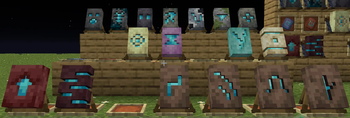
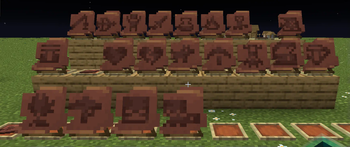
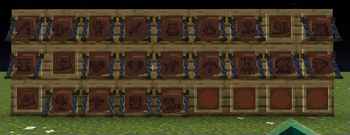
A resource pack that lets you place 3D armor trim templates on walls and floors. Just rename the item and place it in an item frame.
I don't know my version or loader
3D Armor Trims
Ru Русский📦 Этот ресурспак добавляет возможность размещать кузнечные шаблоны (armor trims) в виде декоративных 3D-объектов на стенах и полу.
🧱 Как использовать?
Просто переименуйте любой кузнечный шаблон в:
3d_floor— чтобы разместить на полу3d_wall— чтобы повесить на стену
Шаблон автоматически примет форму декоративного элемента с реалистичной 3D-моделью.
⚠️ Работает только при наличии CIT Resewn, Optifine или CEM.
🔮 Планы:
- Поддержка 3d_flow_armor_trim и 3d_bolt_armor_trim
- Поддержка 3d_flow_pottery_sherd, 3d_guster_pottery_sherd, 3d_scrape_pottery_sherd
- Новый аватар
📦 This resource pack allows you to place armor trims templates as decorative 3D objects on walls and floors.
🧱 How to use?
Just rename any armor trim template to:
3d_floor— to place it on the floor3d_wall— to hang it on the wall
The template will automatically turn into a realistic 3D model.
⚠️ Requires CIT Resewn or Optifine
🔮 Future plans:
- Add 3d_flow_armor_trim and 3d_bolt_armor_trim
- Add 3d_flow_pottery_sherd, 3d_guster_pottery_sherd, 3d_scrape_pottery_sherd
- New avatar
🔧 Requirements

🌐 Social Links






- Edition: Minecraft Java
- File type: .zip (resource pack)
- Minecraft versions listed: 1.21.5, 1.21.6, 1.21.7
- How to install: Download the .zip resource pack — do not unzip it. → Put it in .minecraft/resourcepacks. → Enable it in Options → Resource Packs.
- Where to get it: Opens on Modrinth — not every file is mirrored on our own servers.
Install steps are the general flow for this file type — How to install Minecraft Java resource packs walks through it step by step.
- Downloads as 3d_trims_converted.zip
- Download size: 256 KB
- Download link checked 29 Aug 2026 — working
These come from our own check of the pack file, not from the source page.