
End netherite
Texture Pack Name: End Netherite - Purple Netherite Description: Hey, fellow Minecrafters! Have you ever felt that the standard netherite gear just looked…
I don't know my version or loader
 Netherite retextured
Hey, fellow Minecrafters! Have you ever felt that the standard netherite gear just looked a bit too gloomy? I always thought it lacked that magical touch. So, I decided to give it a fresh, mystical twist inspired by the End dimension. Introducing End Netherite, where your netherite tools and armor get a stunning purple makeover, as if they were infused with the power of the End!
What does End Netherite change?
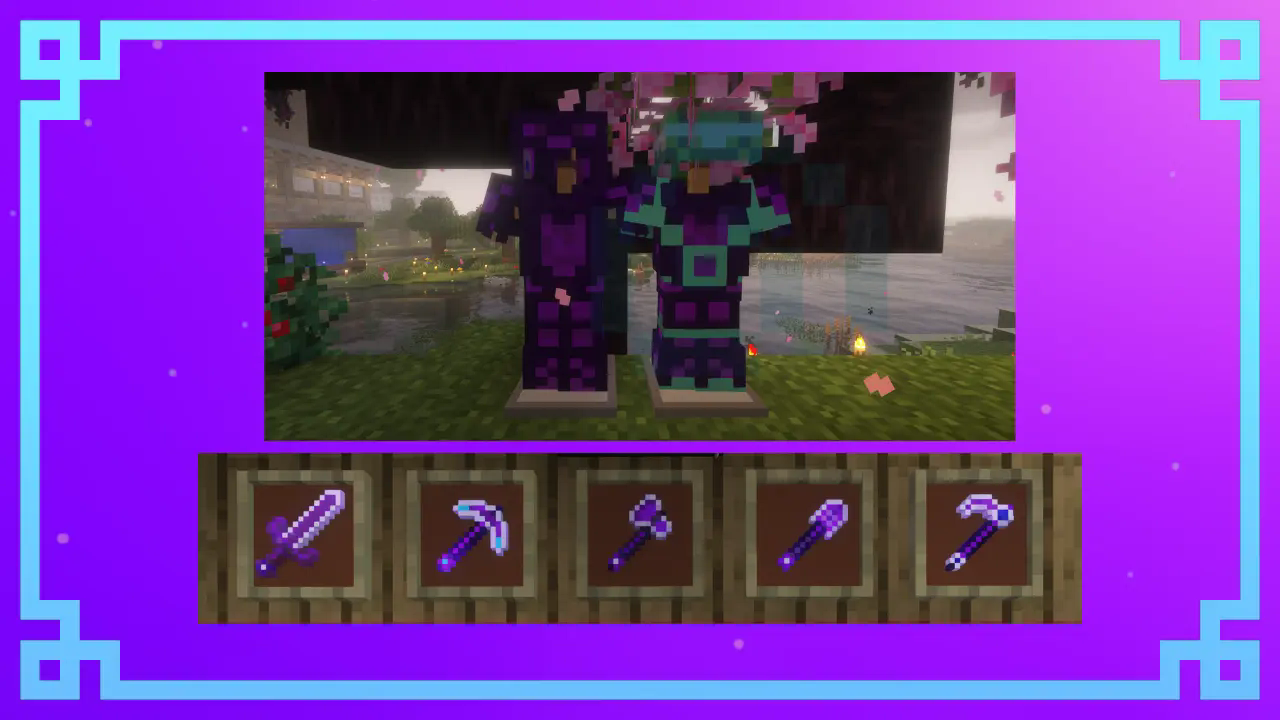
Netherite Armor: Completely revamped with a rich purple glow that makes it look like it was crafted in the End itself. Now you’ll look both stylish and powerful.
Netherite Sword: The sword features a sleek, purple blade with intricate runic designs that make it feel like a legendary End weapon.
Netherite Tools (Pickaxe, Axe, Shovel, Hoe): These tools now shimmer with a purple tint, giving the impression they’ve absorbed mysterious End energy. Perfect for taking on any dimension!
Netherite Block: Recolored into a deep, rich purple, this block is perfect for End-themed builds or just showing off your rare materials.
Why should you try End Netherite?
Standout Look: With these vibrant, eye-catching textures, your gear will stand out whether you're exploring the Overworld or battling in the End.
End Dimension Vibes: If you’re a fan of the End, this pack will bring that eerie, mystical atmosphere right into your netherite gear.
Easy Installation: It’s super simple to install—just drop it into your resource packs folder, and you’re ready to show off your new, enhanced netherite gear.
I’ve worked hard to make sure everything looks just right, so give it a try and let me know h
ow it looks in your world!
- Edition: Minecraft Java
- File type: .zip (resource pack)
- Minecraft versions listed: 1.20.2, 1.20.3, 1.20.4
- How to install: Download the .zip resource pack — do not unzip it. → Put it in .minecraft/resourcepacks. → Enable it in Options → Resource Packs.
- Where to get it: Opens on Modrinth — not every file is mirrored on our own servers.
Install steps are the general flow for this file type — How to install Minecraft Java resource packs walks through it step by step.
- Downloads as §cEND §4Netherite§0 1.1.zip
- Download size: 20 KB
- Download link checked 29 Aug 2026 — working
These come from our own check of the pack file, not from the source page.