HomeJavaDatapacksHarry Potter | And The Wizarding World
Harry Potter | And The Wizarding World
DatapacksJava

Harry Potter | And The Wizarding World

by MrSheep · on Modrinth

⬇ Download on Modrinth
Harry Potter | And The Wizarding World — screenshot 1Harry Potter | And The Wizarding World — screenshot 2Harry Potter | And The Wizarding World — screenshot 3Harry Potter | And The Wizarding World — screenshot 4Harry Potter | And The Wizarding World — screenshot 5Harry Potter | And The Wizarding World — screenshot 6Harry Potter | And The Wizarding World — screenshot 7

Main Title


Information

Beta 3 is the ONLY stable version right now!! (and has alot more content). I suggest downloading 0.3 over 0.2.1a

To see more behind the scenes, join my Discord

Installation Steps

Mod

Datapack And Resourcepack

The datapack and Resourcepack are a 2 in 1 file meaning, you can put the same zip folder in both the datapack and the resourcepack folders. It will say incompatible, ignore it.. the game thinks its right when its not..

(Credit to The_Freenix for the amazing hogwarts map I used in the banner!)


Roadmap Release 1.0 (Next Update)

Roadmap Release 1.0 (Next Update)

Roadmap

Beta 0.3 (Latest Update)

Changelog

Changelog Beta 0.3

Additions

Bug Fixes

Changes

Bug Fixes


Introduction

If you've ever read the Harry Potter book series by the author, J. K. Rowling, then you have most likely wondered.. "These books are incredible.. I WISH IT WAS IN MINECRAFT!". Well Im proud to present, Harry Potter | And The Wizarding World! Its a fan made datapack and Mod that brings exactly everything you've ever read in the Harry Potter series, right into your survival world or server.

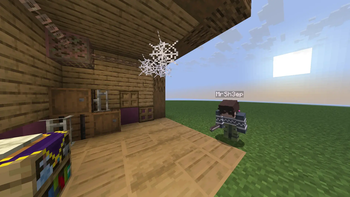
Harry Potter | And the Wizarding World is desigend to be integrated into a survival world, so you can experience Harry Potter outside of an adventure map!

Duel your friends with your choice of 27 wands, customize your spell wheel with over 30+ spells(not fully added yet), and experience the magical world of Harry Potter with your friends like never before!


Features

Crafting

Recipes

Recipes

Wand Crafting Table

wand_crafting_table_recipe

Phoenix Feather

phoenix feather

Dragon Heartstring

Dragon Heartstring

Unicorn Hair

Unicorn Hair

Wand Crafting Table

Wand crafting is made easy with a custom crafting system! Simply throw your choice of wood and wand core onto the wand crafting table, and the wand will apear right on top!

wand crafting gif wand crafting table
(This is an example of crafting a Mangrove Unicorn Hair Wand!)

Wand Crafting Materials

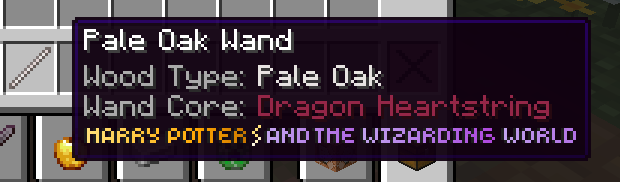
Wand Cores:
Wood Types:
wood types are stripped woods. Ex: Oak Stripped Wood

Wands

(A picture of all current 27 wand varrients. 9 wood types, 3 cores, and a picture of Dragon Heartstring, Phoenix Feather, and the Unicorn Hair wand cores)

The Main Wand

About

The main tool of Harry Potter | And The Wizarding World is the wand, also know as the Main wand, to differentiate the Main wand And Spell wheel wands. The main wand is the item that allows you to control your activated spell (if avalible), or open the spell wheel, a UI overlay above your hotbar, displaying customizable pages of binded spells, making dueling and fighting with wands easy and cinimatic! (more information can be found in the "The Spell Wheel" section below)

main_wand_showcase

Controls

The Spell Wheel

About

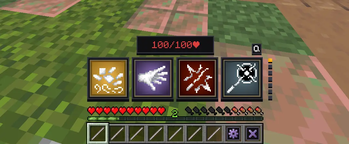
The highlight of the project is the Spell Wheel; a completely custom UI (that is far to complicated to explain) which displays seven pages, each with four spell slots above the hotbar. You can bind any spell to any slot, and activate that slot with the respective keybind (read below) to activate that spell! (You can even bind more than one spell on the same page!)

This video showcases the spell Lumos

Activation and Deactivation

Activating the spell wheel could not be more simple! Simply press the use.item/place.block keybind (Default: Right Click) to open the spell wheel.

Closing the spell wheel is just as easy. Again, press the attack / destroy keybind (Default: Right Click) on the exit button (hotbar slot 9) to exit the spell wheel. Once done, you automatically recive all of your hotbar items back! (and any wands extra wands from the spell wheel is also removed..)

Controls

The spell wheel has 7 pages, and 2 buttons. Every page has 4 slots. Scroll with your mouse to change pages The first slot is activated by single pressing the attack/destroy keybind (default: Left Click). The second slot is activated by doubble pressing the attack/destroy keybind. The third and fourth slot can be activated the same way, just by pressing and doubble pressing the use.item/place.block keybind (default: Right Click)

Buttons

for both buttons, press the use.item/place_block keybind to trigger them

Settings Button: Press the settings button to open a GUI, where you can bind spells to specific slots in specific pages.
settings menu showcase
Exit Button: The Exit button will simply exit the spell wheel, returning all of your hotbar items, including your main wand!

Spells Expelliarmus

Expelliarmus

Expelliarmus is an essential damgage spell when it comes to dueling. cast this powerful charm and disarm your enimies wand! very powerful..

Depulso

Depulso

Depulso is a powerful charm used everywhere in the Wizarding world. Cast this spell and watch, as your opponents fly into the air! (even more useful if paired with the Levioso Charm!)

Levioso

Levioso

Levioso, one of the most common offense/defense charms in the wizzarding world. With an effortless flick of the wand, levitate your enimies high in the air, allowing you to make an attack!

Lumos

Lumos

Lumos is an essential charm in the Wizarding World. Lumos allows you to shine a light for any ammount of time at your location. You can also exit your spell wheel and still have lumos activated when holding your main wand! (you can quickly deactivate it with the main wand spell trigger action)

lumos spell showcase image Basic Cast

Basic Cast

Protego

Protego

protego_showcase


Known Bugs

if any bugs appear, try reseting your wand wheel player data with /function pack:main/spellwheel/wheel/function/reset_player_data or use the button in the spell wheel settings menu. If that still does not work, run a hard reset with /function pack:main/spellwheel/wheel/reset_global_storage and then run /reload

If you find any bugs, please share them on my GitHub Page

Quick facts

Install steps are the general flow for this file type — see the MC Java Mods guides for the full walkthrough.

Verified by MCModsHub

These come from our own check of the pack file, not from the source page.

Explore more