
ResourcepacksJava
Default Pink Mode
I don't know my version or loader
Open the Minecraft launcher and look at the profile you play on — it names both, like fabric-loader-1.21.4. The version also shows in the bottom-right corner of the game's main menu.
No loader in the profile name? Then it's plain Minecraft, and these mods won't run — you need Fabric or NeoForge installed first.
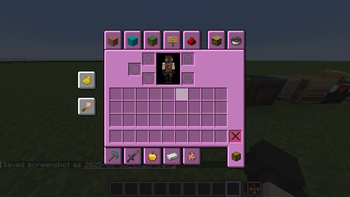
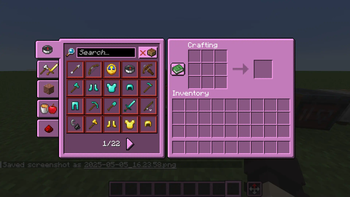
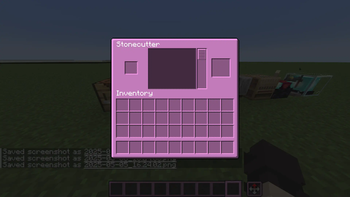
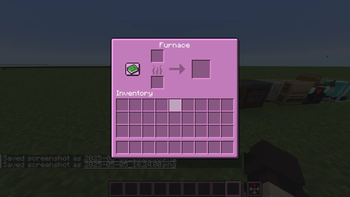
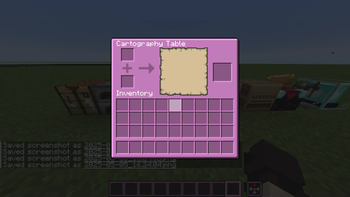
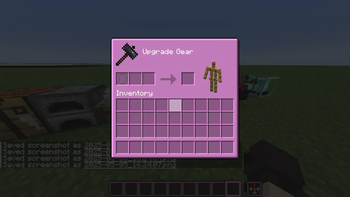
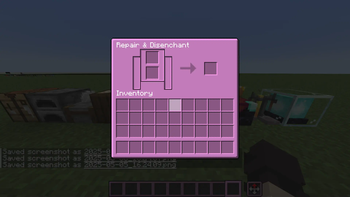
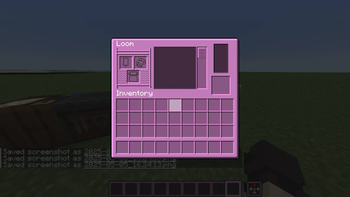
The Pink Mode Resource Pack for Minecraft: Java Edition
This resource pack changes all GUI interfaces in the game to a custom pink interface. This resource pack is a remake of Default Dark Mode made with darkomizer
Compatibility
Minecraft: Java Edition 1.6 through 1.20 is supported.
Optional: Optifine is required for the custom loading screen.
Mod Support
The following mods are supported (versions for Fabric & Forge should both work):
| Mod | 1.20 | 1.19 | 1.18 | 1.17 | 1.16 | 1.15 | 1.12 |
| Adorn | ✅ | ✅ | ✅ | ❌ | ❌ | ❌ | ❌ |
| Applied Energistics 2 | ✅ | ✅ | ✅ | ❌ | ❌ | ❌ | ❌ |
| AE2 Things | ❌ | ❌ | ❌ | ✅ | ❌ | ❌ | ❌ |
| AE2 Wireless Terminals | ✅ | ✅ | ✅ | ❌ | ❌ | ❌ | ❌ |
| Backpacked | ❌ | ✅ | ✅ | ❌ | ❌ | ❌ | ❌ |
| Bedrockify | ✅ | ✅ | ✅ | ✅ | ❌ | ❌ | ❌ |
| Better Advancements | ✅ | ✅ | ✅ | ❌ | ❌ | ❌ | ❌ |
| BetterEnd | ✅ | ✅ | ✅ | ❌ | ❌ | ❌ | ❌ |
| Biome Makeover | ✅ | ✅ | ✅ | ❌ | ❌ | ❌ | ❌ |
| Brewin' And Chewin' | ✅ | ✅ | ❌ | ❌ | ❌ | ❌ | ❌ |
| Capes | ✅ | ✅ | ✅ | ✅ | ❌ | ❌ | ❌ |
| Charm | ✅ | ✅ | ✅ | ❌ | ❌ | ❌ | ❌ |
| Cloth Config API | ✅ | ✅ | ✅ | ✅ | ✅ | ✅ | ❌ |
| Compact Storage | ❌ | ✅ | ❌ | ❌ | ❌ | ❌ | ❌ |
| Creative Library | ❌ | ❌ | ✅ | ❌ | ❌ | ❌ | ❌ |
| Dank Storage | ❌ | ❌ | ✅ | ❌ | ❌ | ❌ | ❌ |
| Easy Anvils | ✅ | ✅ | ❌ | ❌ | ❌ | ❌ | ❌ |
| Easy Magic | ✅ | ✅ | ✅ | ❌ | ❌ | ❌ | ❌ |
| Easy Villagers | ✅ | ✅ | ✅ | ✅ | ❌ | ❌ | ❌ |
| EMI (Item and Recipe Viewer) | ✅ | ✅ | ✅ | ❌ | ❌ | ❌ | ❌ |
| Enchanting Infuser | ✅ | ✅ | ✅ | ✅ | ❌ | ❌ | ❌ |
| Expanded Delight | ✅ | ✅ | ✅ | ❌ | ❌ | ❌ | ❌ |
| Expanded Storage | ✅ | ✅ | ✅ | ❌ | ❌ | ❌ | ❌ |
| Fabric | ✅ | ✅ | ✅ | ✅ | ✅ | ✅ | ❌ |
| Farmer's Delight | ✅ | ✅ | ✅ | ✅ | ✅ | ✅ | ❌ |
| Farmer's Respite | ✅ | ✅ | ❌ | ❌ | ❌ | ❌ | ❌ |
| Frame API | ✅ | ✅ | ✅ | ❌ | ❌ | ❌ | ❌ |
| Galosphere | ✅ | ✅ | ✅ | ❌ | ❌ | ❌ | ❌ |
| Inmis | ✅ | ✅ | ✅ | ❌ | ❌ | ❌ | ❌ |
| InmisAddon | ✅ | ✅ | ✅ | ❌ | ❌ | ❌ | ❌ |
| Inventorio | ✅ | ✅ | ❌ | ❌ | ❌ | ❌ | ❌ |
| Inventory HUD+ | ✅ | ✅ | ✅ | ❌ | ❌ | ❌ | ❌ |
| Inventory Profiles Next | ✅ | ✅ | ✅ | ❌ | ✅ | ❌ | ❌ |
| Inventory Sorting | ✅ | ✅ | ✅ | ❌ | ❌ | ❌ | ❌ |
| Iron Chests | ✅ | ✅ | ✅ | ✅ | ✅ | ✅ | ❌ |
| Item Filters | ✅ | ✅ | ✅ | ❌ | ❌ | ❌ | ❌ |
| Just Enough Items (JEI) | ✅ | ✅ | ✅ | ✅ | ✅ | ✅ | ❌ |
| Just Enough Resources (JER) | ✅ | ❌ | ❌ | ❌ | ❌ | ❌ | ❌ |
| Language Reload | ✅ | ✅ | ✅ | ❌ | ❌ | ❌ | ❌ |
| Let's do Wine! | ✅ | ✅ | ❌ | ❌ | ❌ | ❌ | ❌ |
| LibGui | ✅ | ✅ | ❌ | ❌ | ❌ | ❌ | ❌ |
| Lovely Snails | ✅ | ✅ | ❌ | ❌ | ❌ | ❌ | ❌ |
| Mod Menu | ✅ | ✅ | ✅ | ✅ | ✅ | ❌ | ❌ |
| Oh The Biomes You'll Go | ✅ | ✅ | ✅ | ❌ | ❌ | ❌ | ❌ |
| Origins | ✅ | ✅ | ✅ | ❌ | ❌ | ❌ | ❌ |
| owo-lib | ✅ | ✅ | ✅ | ❌ | ❌ | ❌ | ❌ |
| Paradise Lost | ✅ | ✅ | ✅ | ❌ | ❌ | ❌ | ❌ |
| Piercing Paxels | ✅ | ✅ | ✅ | ❌ | ❌ | ❌ | ❌ |
| Polymorph | ✅ | ✅ | ✅ | ❌ | ❌ | ❌ | ❌ |
| Roughly Enough Items (REI) | ✅ | ✅ | ✅ | ❌ | ❌ | ❌ | ❌ |
| Shulker Box Tooltip | ✅ | ✅ | ✅ | ✅ | ❌ | ❌ | ❌ |
| Shulker Preview | ✅ | ✅ | ✅ | ✅ | ❌ | ❌ | ❌ |
| Shulker Tooltip | ✅ | ✅ | ✅ | ✅ | ❌ | ❌ | ❌ |
| Simple Voice Chat | ✅ | ✅ | ✅ | ✅ | ❌ | ❌ | ❌ |
| Sophisticated Backpacks | ✅ | ✅ | ✅ | ❌ | ❌ | ❌ | ❌ |
| Sophisticated Core | ✅ | ✅ | ✅ | ❌ | ❌ | ❌ | ❌ |
| The Bumblezone | ✅ | ✅ | ✅ | ❌ | ❌ | ❌ | ❌ |
| The Twilight Forest | ✅ | ✅ | ✅ | ❌ | ❌ | ❌ | ❌ |
| Tinkers' Construct | ❌ | ❌ | ❌ | ❌ | ✅ | ❌ | ❌ |
| Tom's Simple Storage | ✅ | ✅ | ✅ | ❌ | ❌ | ❌ | ❌ |
| Transmog | ✅ | ❌ | ❌ | ❌ | ❌ | ❌ | ❌ |
| TrashSlot | ✅ | ✅ | ✅ | ✅ | ❌ | ❌ | ❌ |
| Traveler's Backpack | ✅ | ✅ | ✅ | ❌ | ❌ | ❌ | ❌ |
| Trinkets | ✅ | ✅ | ✅ | ❌ | ❌ | ❌ | ❌ |
| Ultimate Car Mod | ✅ | ✅ | ✅ | ✅ | ❌ | ❌ | ❌ |
| Upgraded Shulkers | ❌ | ✅ | ✅ | ✅ | ❌ | ❌ | ❌ |
| Useful Backpacks | ✅ | ✅ | ✅ | ❌ | ❌ | ❌ | ❌ |
Quick facts
- Edition: Minecraft Java
- File type: .zip (resource pack)
- Minecraft versions listed: 1.20.2, 1.20.3, 1.20.4
- How to install: Download the .zip resource pack — do not unzip it. → Put it in .minecraft/resourcepacks. → Enable it in Options → Resource Packs.
- Where to get it: Opens on Modrinth — not every file is mirrored on our own servers.
Install steps are the general flow for this file type — How to install Minecraft Java resource packs walks through it step by step.
Verified by MCModsHub
- Downloads as Default-Pink-Mode-1.20.2.zip
- Download size: 674 KB
- Download link checked 29 Aug 2026 — working
These come from our own check of the pack file, not from the source page.