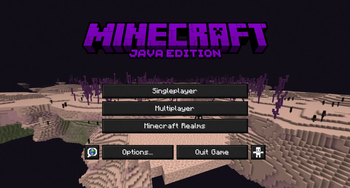

End UI
visual style across Minecraft’s user interface. The project focuses on clarity, readability, and visual cohesion while maintaining the structure and functionality of the original UI.
This pack replaces a wide range of interface elements with a unified purple aesthetic inspired by the End dimension. It is designed for players who prefer a clean, modern interface that enhances the overall presentation of the game without altering gameplay mechanics.
What This Pack Changes Custom versions of the Mojang, Minecraft, and Java Edition logos
Recolored menus, buttons, and loading bars
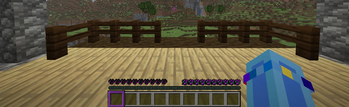
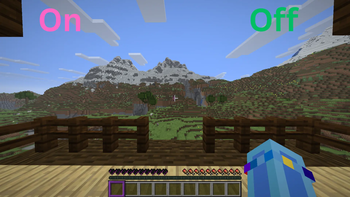
Updated HUD elements, including hearts, hunger, armor, and the experience bar
A consistent End‑themed color palette applied across all interface components
Why This Pack May Be Useful End UI Overhaul provides a complete visual refresh for players who want a more atmospheric and thematic interface. The design emphasizes consistency and readability, offering a distinct End‑inspired appearance while preserving the usability of the vanilla UI. It is suitable for players seeking a polished and cohesive interface experience.
- Edition: Minecraft Java
- File type: .zip (resource pack)
- Minecraft versions listed: 1.21, 1.21.1, 24w33a
- How to install: Download the .zip resource pack — do not unzip it. → Put it in .minecraft/resourcepacks. → Enable it in Options → Resource Packs.
- Where to get it: Opens on Modrinth — not every file is mirrored on our own servers.
Install steps are the general flow for this file type — How to install Minecraft Java resource packs walks through it step by step.
- Downloads as End UI Overhaul.zip
- Download size: 12.7 MB
- Download link checked 24 Aug 2026 — working
These come from our own check of the pack file, not from the source page.