
Anchor Ovelay
Java resource pack listed for Minecraft 1.21–26.x. Downloads from the MC Java Mods app on Android.
Anchor Overlay is a Crystal PvP resource pack designed by Ray Senpai. It uses color-coded Respawn Anchors to display charge levels clearly, helping…
⬇ Download on Modrinth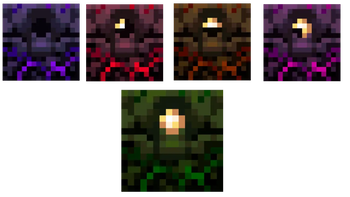
⚓ Anchor Overlay
Anchor Overlay is a simple and useful resource pack made especially for Crystal PvP players. This pack changes the appearance of Respawn Anchors so you can quickly identify their charge level during fights without needing to check closely.
The pack uses different colors for each charge stage, making Anchor PvP easier, faster, and more comfortable. Whether you are practicing, playing ranked matches, or fighting in competitive Crystal PvP, this overlay helps you understand an anchor's charge level at a glance.
Features
• 🟣 Purple Anchor = 0 Charges (Empty)
• 🔴 Red Anchor = 1 Charge
• 🟠 Orange Anchor = 2 Charges
• 🩷 Pink Anchor = 3 Charges
• 🟢 Green Anchor = Full Charge
With these color changes, you can instantly recognize how many times an anchor has been charged with Glowstone. This helps improve reaction time and reduces mistakes during intense PvP battles.
Why Use This Pack?
• Easy to understand color system
• Designed specifically for Crystal PvP
• Helps identify anchor charge levels quickly
• Clean and simple overlay design
• Useful for both beginners and experienced players
• Improves awareness during fights
This pack focuses on visibility and practicality rather than flashy effects, making it a great choice for players who want a clean PvP experience.
Information
Pack Design By: Ray Senpai
Pack Type: Anchor Overlay
Best Used For: Crystal PvP
If you're looking for a simple overlay that makes Anchor PvP easier and more efficient, Anchor Overlay is a great addition to your resource pack collection. Enjoy faster charge recognition and a cleaner PvP experience with this lightweight and easy-to-use pack. ⚓
- Edition: Minecraft Java
- File type: .zip (resource pack)
- Minecraft versions listed: 1.21.9, 1.21.10, 1.21.11
- How to install: Download the .zip resource pack — do not unzip it. → Put it in .minecraft/resourcepacks. → Enable it in Options → Resource Packs.
- Where to get it: Opens on Modrinth — not every file is mirrored on our own servers.
Install steps are the general flow for this file type — How to install Minecraft Java resource packs walks through it step by step.
- Downloads as Anchor Overlay v1.zip
- Download size: 30 KB
- Download link checked 17 Oct 2026 — working
These come from our own check of the pack file, not from the source page.