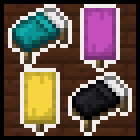
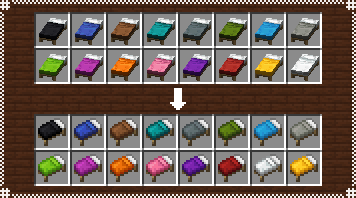
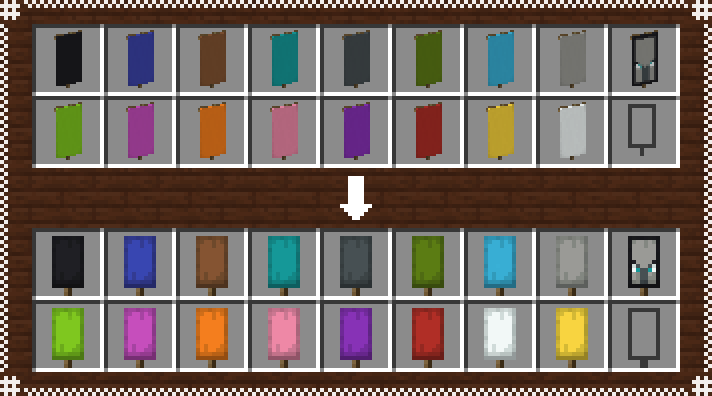
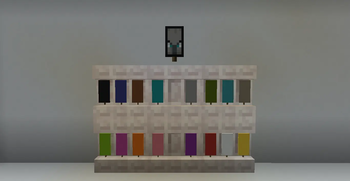
With this pack installed, beds and banners will be given 2d icons for when held by the player(banners still show up as models in this case), seen in the inventory, dropped in the ground or when put in an item frame.
Bed icons are reminiscent of their original icons from past versions, but with adjusted shading to better fit the current textures.
Banner icons are inspired by the angle used in sign icons, so a flat frontal look. There are two things to keep in mind is while using this pack however:
- Patterns arent shown in banner icons, only its base color.
- And that the Ominous Banner Icon remains unchanged even when you remove layers from it.
Quick facts
- Edition: Minecraft Java
- File type: .zip (resource pack)
- Minecraft versions listed: 1.21.9, 1.21.10, 1.21.11
- How to install: Download the .zip resource pack — do not unzip it. → Put it in .minecraft/resourcepacks. → Enable it in Options → Resource Packs.
- Where to get it: Opens on Modrinth — not every file is mirrored on our own servers.
Install steps are the general flow for this file type — How to install Minecraft Java resource packs walks through it step by step.
Verified by MCModsHub
- Downloads as Woven_Icons_v11.zip
- Download size: 43 KB
- Download link checked 10 Sept 2026 — working
These come from our own check of the pack file, not from the source page.