
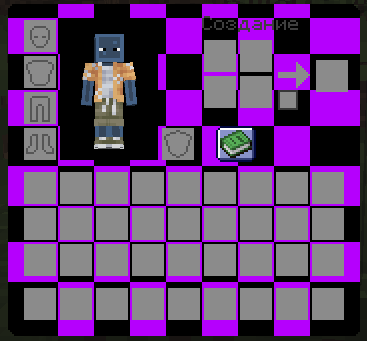
Missing GUI is a simple resource pack that replaces every single GUI element with the classic "missing texture" pattern.
For download different color click to versions
Features ✅ All inventory slots (main, hotbar, armor, crafting, etc.) replaced with purple & black checkerboard grid
✅ Clean, minimalist, glitched aesthetic
✅ No distractions — only the grid
✅ Works with any Minecraft version (just match the pack format)
How it looks Every interface component — from the crafting table to the inventory screen — uses the iconic missing-texture texture. No custom textures, no fancy gradients. Just the grid.
Why use this pack? Perfect for hardcore worlds
Fun for trolling friends or content creation
Minimalist / glitch art enjoyers
Compatibility Works with any resource pack-friendly version of Minecraft (Java Edition). Just select the pack in your resource packs menu and enjoy.
- Edition: Minecraft Java
- File type: .zip (resource pack)
- Minecraft versions listed: 1.20, 1.20.1, 1.20.2
- How to install: Download the .zip resource pack — do not unzip it. → Put it in .minecraft/resourcepacks. → Enable it in Options → Resource Packs.
- Where to get it: Opens on Modrinth — not every file is mirrored on our own servers.
Install steps are the general flow for this file type — How to install Minecraft Java resource packs walks through it step by step.
- Downloads as Missing GUI.zip
- Download size: 71 KB
- Download link checked 12 Sept 2026 — working
These come from our own check of the pack file, not from the source page.