
OutlineWars GUI
A clean, flat, and distraction-free GUI & HUD overlay designed for BedWars. Features 128+ custom textures for max visibility in PvP!
I don't know my version or loader

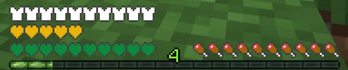
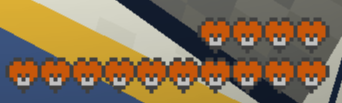
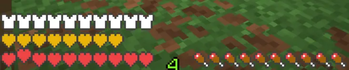
Overview: Elevate your PvP experience with the official OutlineWars GUI! This is a specialized overlay resource pack that completely overhauls your HUD, menus, and containers. Built by the SquadXTeam, we manually redesigned 128 textures to give you the cleanest screen possible during intense BedWars and SkyWars matches.
✨ Key Features:
Ultra-Clean HUD: Custom, flat-colored hearts, armor icons, food bars, and crosshairs. We removed all unnecessary shading so you can focus 100% on the fight.
Optimized Menus: Redesigned inventory, chests, and crafting tables that won't distract you while looting or managing items.
Universal Overlay: You can use this pack on its own, OR put it at the top of your resource pack list to apply our custom GUI over any of your favorite texture packs!
Perfect Match: Designed to pair flawlessly with the original OutlineWars 16x texture pack.
⚙️ How to use: Just place this pack at the TOP of your selected resource packs list in the game settings to ensure our GUI overrides the default or other packs.
Developed by SquadXTeam.
- Edition: Minecraft Java
- File type: .zip (resource pack)
- Minecraft versions listed: 1.21.10, 1.21.11-pre5, 1.21.11-rc1
- How to install: Download the .zip resource pack — do not unzip it. → Put it in .minecraft/resourcepacks. → Enable it in Options → Resource Packs.
- Where to get it: Opens on Modrinth — not every file is mirrored on our own servers.
Install steps are the general flow for this file type — How to install Minecraft Java resource packs walks through it step by step.
- Downloads as v2Modrint.zip
- Download size: 589 KB
- Download link checked 22 Aug 2026 — working
These come from our own check of the pack file, not from the source page.