
Sulfur Cube Transparency Fix
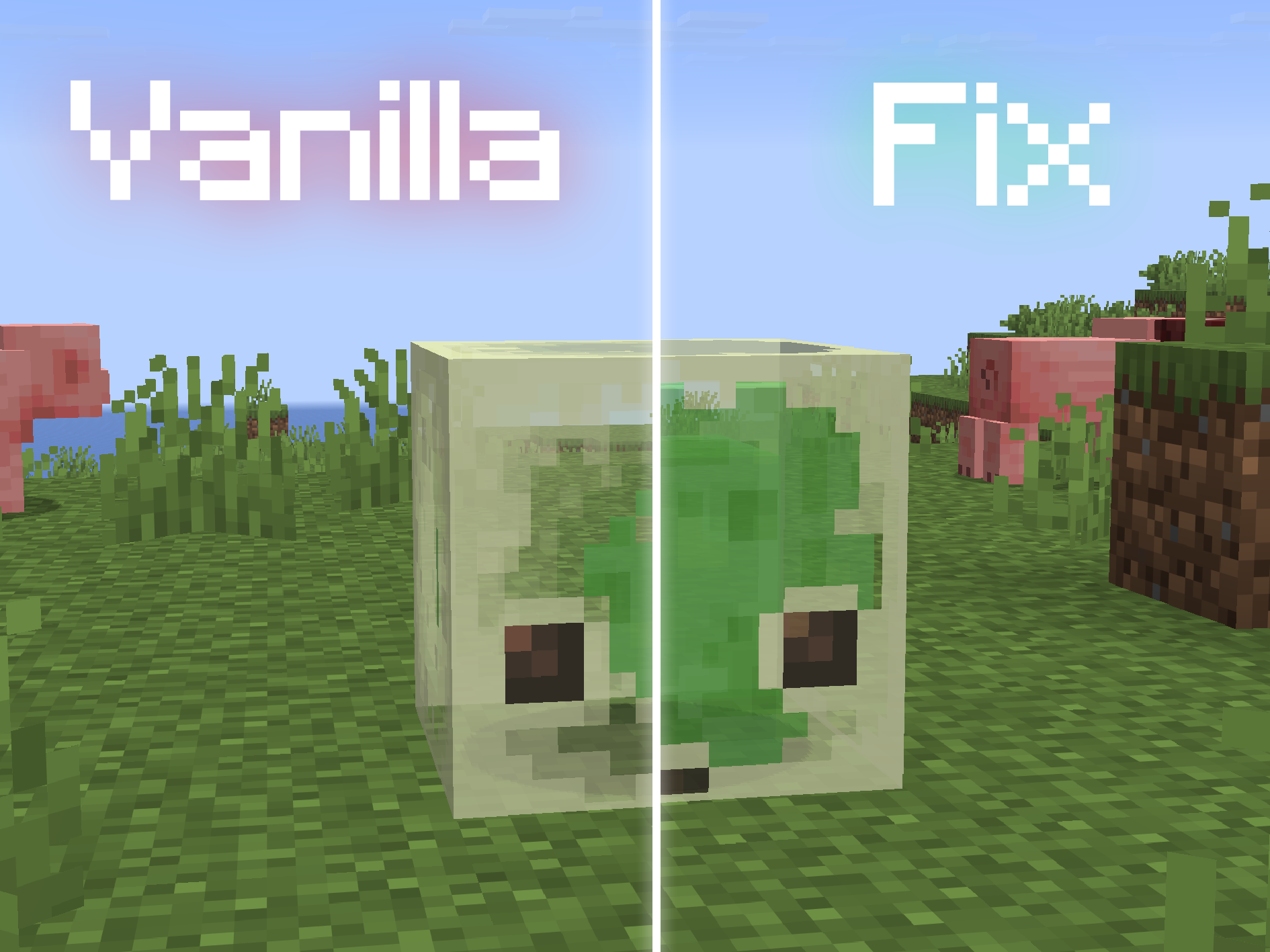
Putting transparent blocks into a Sulfur Cube, e.g. with commands or with a mod, will result in a weird graphical issue where the inside is not rendered. This pack fixes this issue. Unfortunately though, this has to remove transparency from the Sulfur Cube texture.
Check out Anything in Sulfur Cubes to put way more blocks in Sulfur Cubes with fitting properties, including transparent blocks!
Quick facts
- Edition: Minecraft Java
- File type: .zip (resource pack)
- Minecraft version listed: 26.2
- How to install: Download the .zip resource pack — do not unzip it. → Put it in .minecraft/resourcepacks. → Enable it in Options → Resource Packs.
- Where to get it: Opens on Modrinth — not every file is mirrored on our own servers.
Install steps are the general flow for this file type — How to install Minecraft Java resource packs walks through it step by step.
Verified by MCModsHub
- Downloads as Sulfur Cube Transparency Fix 26.2.zip
- Download size: 2 KB
- Download link checked 9 Sept 2026 — working
These come from our own check of the pack file, not from the source page.