![Night Visions Shaders [Java]](https://media.forgecdn.net/avatars/969/204/638469866984425651.png)
![Night Visions Shaders [Java] — screenshot 1](https://media.forgecdn.net/attachments/832/598/underwater.png)
![Night Visions Shaders [Java] — screenshot 2](https://media.forgecdn.net/attachments/832/597/torch.png)
![Night Visions Shaders [Java] — screenshot 3](https://media.forgecdn.net/attachments/832/596/night.png)
![Night Visions Shaders [Java] — screenshot 4](https://media.forgecdn.net/attachments/832/595/day.png)
![Night Visions Shaders [Java] — screenshot 5](https://media.forgecdn.net/attachments/832/594/cave.png)
Night Vision Shaders
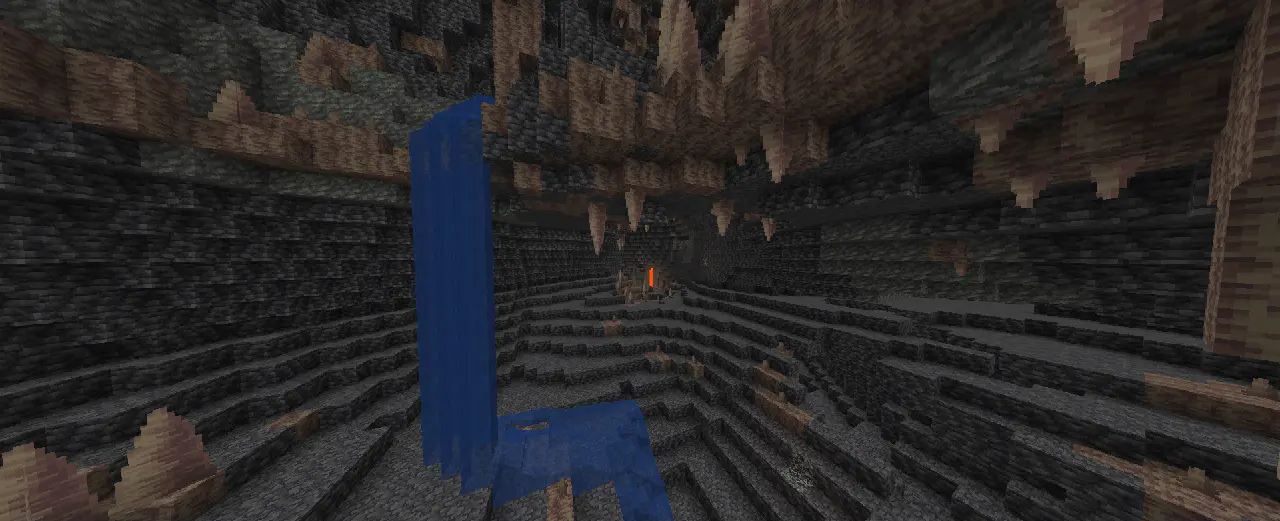
A shaderpack/resourcepack that aims on giving brightness everywhere while keeping the game aesthetic. It makes the game brighter, so you see well in caves, in the nether, underwater and everywhere else. But it also keeps slight light difference so that the aesthetic is not destroyed.
If you like this pack consider supporting the development by buying me a coffee.
Enabling the resourcepack
You can simply enable it as resourcepack (Copy the .zip into the resourcepack directory).
If you are using Sodium or Iris, the Sodium Core Shader Support mod is required.
The pack does not work with Optifine!
Features
While making the game brighter it also keeps the game aesthetic:
- fog is not completely removed, it just starts further away
- light sources still emit light
- blocks still cast shadow, but less dark
- it works with Sodium (requires Sodium Core Shader Support mod)
- Edition: Minecraft Java
- File type: .zip (resource pack)
- Minecraft versions listed: 1.21.11, 1.21.7, 1.21.6
- How to install: Download the .zip resource pack — do not unzip it. → Put it in .minecraft/resourcepacks. → Enable it in Options → Resource Packs.
- Where to get it: Opens on CurseForge — not every file is mirrored on our own servers.
Install steps are the general flow for this file type — see the MC Java Mods guides for the full walkthrough.
Night Visions Shaders [Java] is a free Minecraft Java shader. Compatible with Minecraft 1.21.11, 1.21.7, 1.21.6, 1.21.8 and newer. Downloaded 371,252 times (via CurseForge). Download it and open it directly in the game.