Color Background Chat
Java resource pack listed for Minecraft 26.x. Downloads from the MC Java Mods app on Android.
⬇ Download on Modrinth
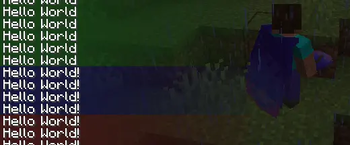

Chat Color Background Resource Pack
📌 Overview
The Chat Color Background resource pack enhances your Minecraft multiplayer or custom server experience by adding custom colored background bars to your chat messages. By utilizing unique character spacing or custom fonts, it allows you to break away from the default, uniform dark chat background and separate notices, global chats, or system alerts with distinct visual themes.
As shown in the initial preview images, this pack enables you to stack different alert levels—such as green for general info, red for critical warnings, and blue for system notices—creating a highly organized and professional server UI.
⚙️ How to Use (Usage)
To display a custom background color with your message, you need to trigger the specific custom characters allocated by the resource pack using the /tellraw command.
Here is the exact syntax to send a message with a custom background:
/tellraw @a [{"text":"𠔻𠔺𠔼","color":"#54fc54"},{"text":"Hello World!","color":"white"}]
🔍 Syntax Breakdown:
"text":"𠔻𠔺𠔼": These unique characters act as the custom font container that renders the solid background bar."color":"#54fc54": This HEX code determines the exact color of your chat background (in this case, a vibrant green). You can swap this out for any RGB hex color code."text":"Hello World!": This is the actual text message displayed on top of or right next to the colored background.
📄 License
- No License / Public Domain: This project does not carry any formal license restrictions. You are free to use, modify, and integrate it into your personal setups or server resource packs.
- Edition: Minecraft Java
- File type: .zip (resource pack)
- Minecraft versions listed: 26.1, 26.1.1, 26.1.2
- How to install: Download the .zip resource pack — do not unzip it. → Put it in .minecraft/resourcepacks. → Enable it in Options → Resource Packs.
- Where to get it: Opens on Modrinth — not every file is mirrored on our own servers.
Install steps are the general flow for this file type — How to install Minecraft Java resource packs walks through it step by step.
- Downloads as color-background-chat.zip
- Download size: 5 KB
- Download link checked 25 Oct 2026 — working
These come from our own check of the pack file, not from the source page.