
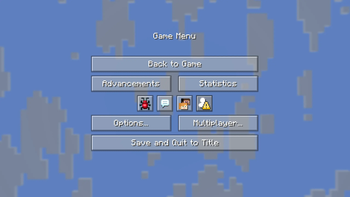

Translucent Buttons gives the options buttons a cleaner, translucent texture that is set to an opacity that balances readability and aesthetics. Buttons now glow when hovered over instead of using an outline. Main and pause menu icons have been centered and improved. Longer sliders may appear bugged in snapshots.
Quick facts
- Edition: Minecraft Java
- File type: .zip (resource pack)
- Minecraft version listed: 1.21.11
- How to install: Download the .zip resource pack — do not unzip it. → Put it in .minecraft/resourcepacks. → Enable it in Options → Resource Packs.
- Where to get it: Opens on Modrinth — not every file is mirrored on our own servers.
Install steps are the general flow for this file type — How to install Minecraft Java resource packs walks through it step by step.
Verified by MCModsHub
- Downloads as Translucent Buttons.zip
- Download size: 76 KB
- Download link checked 23 Aug 2026 — working
These come from our own check of the pack file, not from the source page.