My fantasy trains collection HD version |我的幻想列车合集高清版
Java resource pack listed for Minecraft 1.16–1.20. Downloads from the MC Java Mods app on Android.
I don't know my version or loader
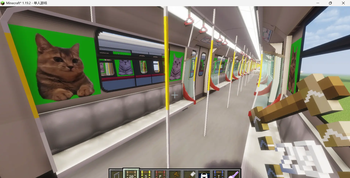
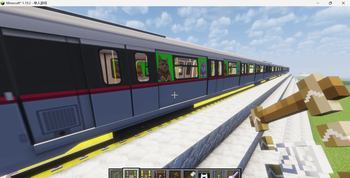
介绍:
这个资源包,同时需要MTR,JCM,MSD和天津地铁 目前包含以下资源(最高版本):
- 首个猫meme列车(4种,每种分为三种长度)
- 每种车都有LCD和车门灯
注意! 只支持MTR4.0.0beta8以上的版本!
B站账号:https://space.bilibili.com/3690971061553353?spm_id_from=333.1007.0.0
快手账号:https://www.kuaishou.com/profile/3xzhv8wqyx4rgfw
Introduction:
This resource package requires MTR, JCM, MSD, and Tianjin Metro Currently, there are these resourses included below(The highest version):
- The first cat meme trains (4 Types, each is divided into three lengths)
- All the trains have LCD and door light
Attention! Only versions later than MTR4.0.0beta8 are supported!
Bilibili account: https://space.bilibili.com/3690971061553353?spm_id_from=333.1007.0.0
Kwai account: https://www.kuaishou.com/profile/3xzhv8wqyx4rgfw
- Edition: Minecraft Java
- File type: .zip (resource pack)
- Minecraft versions listed: 1.16.2, 1.16.3, 1.16.4
- How to install: Download the .zip resource pack — do not unzip it. → Put it in .minecraft/resourcepacks. → Enable it in Options → Resource Packs.
- Where to get it: Opens on Modrinth — not every file is mirrored on our own servers.
Install steps are the general flow for this file type — How to install Minecraft Java resource packs walks through it step by step.
- Downloads as V2.1.zip
- Download size: 3.1 MB
- Download link checked 21 Oct 2026 — working
These come from our own check of the pack file, not from the source page.