
Aim Mark Block Pack
A minimalist Minecraft resource pack that adds a centered aim mark to blocks for a cleaner and more focused visual style.
⬇ Download on Modrinth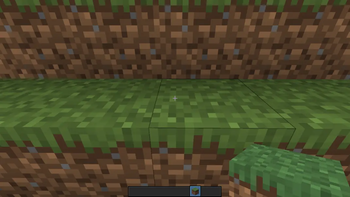
Aim Mark Block Pack
Improve visual focus in Minecraft with subtle centered aim marks placed directly on block textures.
This resource pack adds a clean aim-point style marker to blocks, helping create a more precise and unique visual experience without changing the original Minecraft feel too much.
Features
- Centered aim mark design
- Minimalist and clean style
- Vanilla-friendly textures
- Lightweight resource pack
- Smooth visual alignment
Perfect For
- PvP players
- Precision building
- Minimalist texture setups
- Players who enjoy focused visuals
Style
The pack keeps Minecraft's classic appearance while adding a modern aim-inspired texture detail that naturally blends into gameplay.
Compatibility
Compatible with most Minecraft versions supporting resource packs.
Installation
- Download the resource pack
- Move it to the resourcepacks folder
- Enable it from Minecraft Resource Packs settings
- Launch your world and enjoy the new visuals
Notes
Designed for players who want a subtle but noticeable aiming reference directly on block textures.
- Edition: Minecraft Java
- File type: .zip (resource pack)
- Minecraft versions listed: 1.20.5, 1.20.6, 24w18a
- How to install: Download the .zip resource pack — do not unzip it. → Put it in .minecraft/resourcepacks. → Enable it in Options → Resource Packs.
- Where to get it: Opens on Modrinth — not every file is mirrored on our own servers.
Install steps are the general flow for this file type — How to install Minecraft Java resource packs walks through it step by step.
- Downloads as Dot Crosshair.zip
- Download size: 9 KB
- Download link checked 10 Sept 2026 — working
These come from our own check of the pack file, not from the source page.