
bybyshader
Java shader pack listed for Minecraft 1.19–1.21. File opened and checked on 23 Oct 2026; downloads from the MC Java Mods app on Android.
Lightweight shader adding vibrant colors, soft bloom, subtle chromatic aberration, and gentle film grain. Optimized for smooth performance while enhancing…
⬇ Download on CurseForge
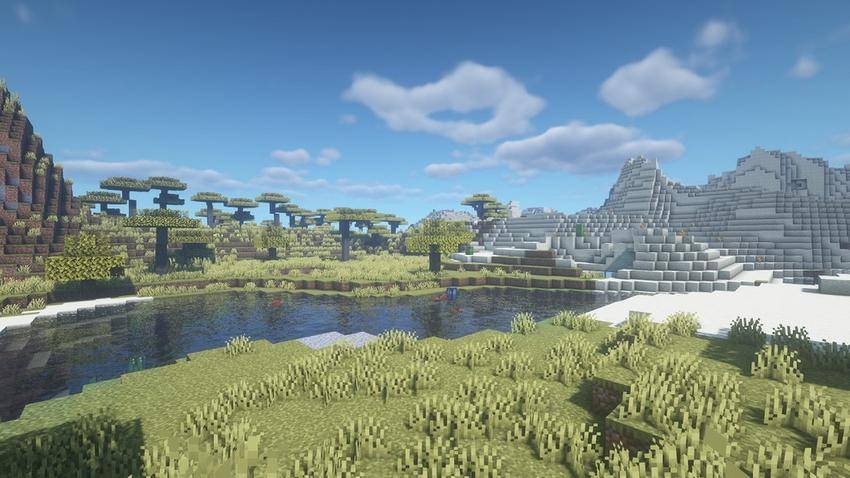
Byby Shader is a lightweight yet visually striking Minecraft shader pack designed to enhance the game’s atmosphere without sacrificing performance. It delivers vibrant, saturated colors and carefully tuned contrast to make every biome pop — from golden grasslands and lush acacia forests to shimmering lakes and bright snowy peaks.
The shader includes soft bloom to smooth out lighting, subtle chromatic aberration for a cinematic lens effect, and gentle film grain that adds texture and immersion. Clouds appear fuller and more dynamic, skies are rich and clear, and water features realistic reflections and shimmer.
Optimized for high FPS, Byby Shader runs smoothly even on mid-range hardware while preserving high-quality visuals. It is fully compatible with both OptiFine and Iris/Fabric, giving players flexibility across mod loaders.
Players can easily customize saturation, bloom, contrast, chromatic aberration, and film grain via shader settings or config files, allowing for a tailored visual experience — from realistic to boldly stylized worlds.
Whether you want to breathe new life into your builds or simply explore a more beautiful Minecraft world, Byby Shader offers a perfect balance between modern effects and lightweight performance.
- Edition: Minecraft Java
- File type: .zip (resource pack)
- Minecraft versions listed: 1.19.3, 1.20.2, 1.21
- How to install: Download the .zip resource pack — do not unzip it. → Put it in .minecraft/resourcepacks. → Enable it in Options → Resource Packs.
- Where to get it: Opens on CurseForge — not every file is mirrored on our own servers.
Install steps are the general flow for this file type — see the MC Java Mods guides for the full walkthrough.
bybyshader is a free Minecraft Java shader. Compatible with Minecraft 1.19.3, 1.20.2, 1.21, 1.20.5 and newer. Downloaded 109,583 times (via CurseForge). Download it and open it directly in the game.