LegacyLight Beta
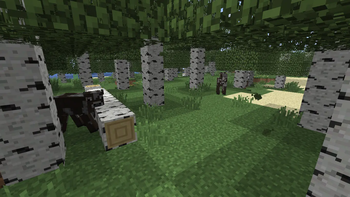
LegacyLight Beta is a lightweight resource pack that brings Minecraft Java's modern lighting closer to the darker, flatter look of the Beta era.
It replaces the modern color-tinted lightmap with a stepped grayscale curve, keeps block light clean and white, reduces the bright ambient lift from newer versions, and adds a darker entity shadow texture for a more grounded old-school look.
Visual Style
The pack is built around a simple legacy lighting feel:
- Grayscale lightmap with no warm block-light tint or blue sky-light tint
- Stronger darkness in caves, corners, and low-light areas
- Stepped brightness levels that feel closer to older Minecraft lighting
- White block light for torches and other light sources
- Darker entity blob shadows using a soft black alpha texture
- Subtle directional contrast on entities, items, and block-entity models
Texture Analysis
The included shadow texture is a 64x64 black alpha mask with a soft radial falloff. Its RGB channels are fully black, while the transparency controls the visible shadow shape. This makes entity shadows appear darker at the center while fading smoothly at the edges.
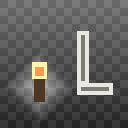
The lightmap preview uses a square stepped grayscale gradient, moving from near-black low light into pale gray and white highlights. This matches the pack's goal: remove modern color grading and return lighting to a simpler, harsher legacy curve.
Recommended Settings
| Setting | Recommended Value |
|---|---|
| Brightness | Moody / 0 |
| Smooth Lighting | Off or Minimum |
| External shader packs | Disabled |
| Pack order | Above packs that edit core shaders or shadow.png |
Compatibility
| Game | Support |
|---|---|
| Minecraft Java Edition | 1.21.11 |
| Loader required | No |
| OptiFine required | No |
| Pack type | Resource pack |
Files Changed
assets/minecraft/shaders/core/lightmap.fshassets/minecraft/shaders/include/light.glslassets/minecraft/textures/misc/shadow.png
Limitations
This pack changes the lightmap, selected core shader behavior, and the entity shadow texture. It does not replace Minecraft's full renderer.
Resource packs cannot fully restore Beta's original ambient occlusion, light propagation, fog behavior, or internal rendering rules. For a fully accurate Beta renderer, a client-side mod would still be required.
Summary
LegacyLight Beta is for players who want modern Minecraft to look darker, simpler, and closer to the classic Beta lighting style without installing a full shader pack or client mod.
- Edition: Minecraft Java
- File type: .zip (resource pack)
- Minecraft version listed: 1.21.11
- How to install: Download the .zip resource pack — do not unzip it. → Put it in .minecraft/resourcepacks. → Enable it in Options → Resource Packs.
- Where to get it: Opens on Modrinth — not every file is mirrored on our own servers.
Install steps are the general flow for this file type — How to install Minecraft Java resource packs walks through it step by step.
- Downloads as LegacyLight.zip
- Download size: 17 KB
- Download link checked 10 Sept 2026 — working
These come from our own check of the pack file, not from the source page.