
ABOUT
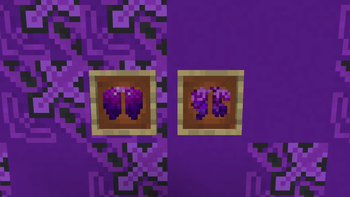
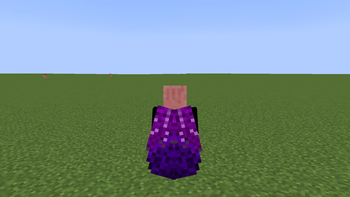
This resource pack replaces the standard boring Elite model with stylish purple Elite models in the style of Ender!
HOW TO INSTALL THIS?First, go to the original modrinth website and find my profile under the name "wolinsky." After that, you'll find this resource pack on my profile, and in the top right corner, there'll be an install button. Then, select the version for your Minecraft and copy the installed file to the resourcepack folder.
IMPORTANT!
- This Minecraft resource pack may appear red, but it's perfectly fine! It will work as intended and won't interfere with other resource packs.
- This texture pack will only work on the Java version, and will not work on Bedrock.
Are you ready to conquer the ender world with such elytras?
Quick facts
- Edition: Minecraft Java
- File type: .zip (resource pack)
- Minecraft versions listed: 1.6.1, 1.6.2, 1.6.4
- How to install: Download the .zip resource pack — do not unzip it. → Put it in .minecraft/resourcepacks. → Enable it in Options → Resource Packs.
- Where to get it: Opens on Modrinth — not every file is mirrored on our own servers.
Install steps are the general flow for this file type — How to install Minecraft Java resource packs walks through it step by step.
Verified by MCModsHub
- Downloads as Ender's Elytra.zip
- Download size: 323 KB
- Download link checked 5 Sept 2026 — working
These come from our own check of the pack file, not from the source page.