
Minecraft Elements - Community Edition (Fanmade)
Java resource pack listed for Minecraft 1.21. Downloads from the MC Java Mods app on Android.
⬇ Download on Modrinth
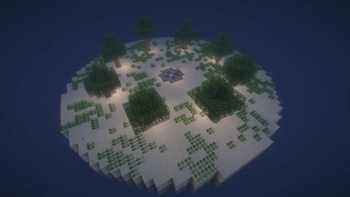
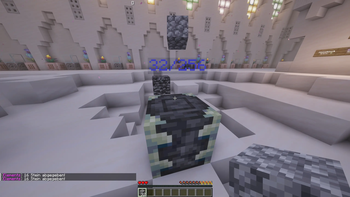
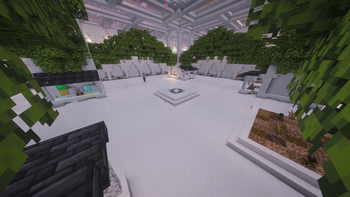
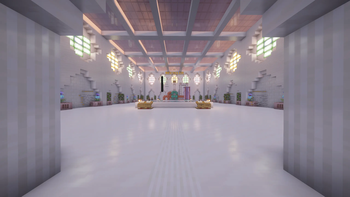
Before you start
This is the recreation of the German project "Minecraft Elements". As I am German and the project was, the whole Datapack's language is german, and therefore the following description. If you still want to check the pack out, you may scroll down and expand the spoiler with the autotranslated english version of this description. Some of the texts in the pack are managed via resourcepack, while some are still hardcoded, if you want to help convert everything to translate keys and help localize the project, i'd appreciate it!
Minecraft Elements - Community Edition (Fanmade)
Minecraft Elements ist ein Projekt, das ursprünglich von SparkofPhoenix erstellt wurde.. Diese Version ist eine eigens nachprogrammierte Version aus einer Mischung von Elements 1 und 2 sowie teilweise 3, enthält aber stark abgewandelte Inhalte. Mehr dazu weiter unten.
Entstehung
Angefangen hatte es mit Stone Attack, welches Spark auch als Datapack veröffentlichte. Im Folgejahr gab es dann Minecraft Elements von welchem früh bekannt wurde, dass dieses nicht veröffentlicht werden würde. Daraufhin habe ich mir zur Aufgabe gemacht, meine eigene Version von Minecraft Elements nachzuprogrammieren. Zu Beginn hatte ich kaum Erfahrung und arbeitete mit Command-Blöcken, später dann mit Datapacks und habe Schritt für Schritt dazugelernt. Nachdem Elements 2 ein Jahr später startete und meine Version noch lange nicht fertig war, hatte ich angefangen einzelne Elemente aus Elements 2 in meiner Version zu integrieren. Auch als Spark, ohne das Datapack direkt zu veröffentlichen, Community-Server erstellte, habe ich weiter gearbeitet, da das Projekt zu diesem Zeitpunkt so weit Fortgeschritten war, dass aufhören nicht in Frage kam. Als Elements 3 startete, war meine Version noch immer nicht fertig, allerdings bereits spielbar und ich beschloss parallel zu Elements 3 mein Projekt mit etwa 20 anderen begeisterten Spielern zu starten. So baute ich unter dem Spielen auch noch einzelne Elemente aus Elements 3, wie zum Beispiel dem Handelsplatz ein, auch wenn das Projekt grundsätzlich im Stil von Elements 1 und 2 blieb. Lange Zeit war ich mir dann nicht sicher ob ich das Pack für jeden zugänglich veröffentlichen kann und will, habe mich jetzt aber dafür entschieden, um auch mein Versprechen aus den ersten Videos, die ich zu diesem Projekt gemacht habe, einzuhalten.
Features
Grundsätzlich kann das Projekt als eine Mischung aller Features von Elements 1+2 sowie einzelner Elemente von Elements 3 und natürlich meinen Ideen und Vorstellungen gesehen werden. Soweit ich mich erinnern kann, sind alle Features aus dem echten Projekt eingebaut. Ich habe außerdem an vielen Stellen Kleinigkeiten verbessert.
Einige der Hauptfeatures sind:
- 6 Stages + Finaler Boss mit eigenen Rätseln sowie den Farmbaren Ressourcen (teils übernommen, teils eigene) mit Farmslot-System
- Fast alle Unique-Items aus Element 1/2 sowie einzelnen eigenen, welche unter anderem durch Insider auf unserem Community-Server entstanden sind
- Die Villager im Hub, sowie dem Techniker mit teils eigenen, teils übernommenen Dialogen
- Für jede Stage einen Boss mit Custom Fähigkeiten sowie eigens gebauten Boss-Räumen
- Alle Features der Enderchest sowie einzelne zusätzliche wie das Level-Casino und weiteren Konfigurations-Möglichkeiten als Admin und Spieler
- Abgabe-Ziele skalierend anhand der Spielerzahl
- Admin-Einstellungen innerhalb der Enderchest, um zum Beispiel Shops für alle zu öffnen, wenn eine Klasse unbesetzt ist.
- Sperren von Abgabezielen durch Admins
- Mana-System sowie alle bekannten Mana-Items
- ... Und noch viel mehr Kleinigkeiten die mir gerade nicht einfallen, oder nicht relevant für diese Liste sind.
Installation
Die Minecraft-Version ist 1.21.3
Da Minecraft in den 1.21.x Versionen in jeder Version sehr viel an dem Datapack-System Verändert hat, empfehle ich keine höhere Version zu verwenden. Auch eine niedrigere Version ist unmöglich, da es in 1.21.3 besonders große Änderungen gab und wichtige Features in niedrigeren Versionen fehlen würden.
Texturepack nicht vergessen!
Du brauchst ein Essentielles Resourcepack damit Elements korrekt funktioniert. Sollte beim Download nur das Zusätzliche Resourcepack auftauchen, siehst du unter dem Tab "Versionen" alle Download. Mehr zur Installation des Resourcepack findest du im folgenden Abschnitt!
So richtest du Elements ein:
- Lade dir von Modrinth oder Github Releases das Datapack herunter.
- Das Hauptdatapack muss auf deinem Server oder Welt in den /datapacks Ordner.
- Du wirst zu beginn Adminrechte brauchen. Im Singleplayer kannst du die Welt auch ohne Cheats erstellen und danach dir über "Open to LAN" kurzzeitig Rechte geben.
- Es spielt keine Rolle ob du das Datapack bei Welterstellung schon im Datapacks Ordner hast oder erst danach. Du musst dann allerdings den Server neu starten oder die Welt neu betreten.
- Wenn du Probleme beim Installieren des Datapacks hast, such auf Youtube oder ähnlichem nach Tutorials
- Bevor du richtig starten kannst solltest du noch das Essentielle Resourcepack installieren.
- Dieses findest du bei Modrinth im "Versions" Tab oder auch bei Github Releases zum Download.
- Im Singleplayer kannst du es wie jedes normale Texturepack installieren. Auf Servern verteilst du es entweder an jeden Spieler manuell, oder nutzt die eingebaute Server-Resourcepack Funktion.
- Gehe dazu auf deinem Server (nachdem er einmal gestartet wurde) in die server.properties Datei.
- Dort findest du ca. bei Zeile 50 einmal
require-resource-packdas solltest du auftruestellen. - bei
resource-packmusst du den download zum aktuellen pack eingeben. Dieser ist aktuellhttps://github.com/TheFoxCraft/minecraft-elements/releases/download/v1.14.0/Elements_Essential_V1.14.0.zip - Du kannst außerdem bei
resource-pack-sha1den "Hash" des Resourcepacks angeben um das erneute Downloaden bei jedem Rejoin zu verhindern. Diesen bekommst du auf Windows so:Get-FileHash .\Elements_Essential_V1.14.0.zip -Algorithm SHA1, wenn du das Resourcepack im selben Ordner hast, in dem das Terminal geöffnet ist. Der Hash ist aktuell bei Version 1.14.0 dieser:6DA74EFA48829071E03C040BC02A132DB3C89891
- Wenn du jetzt das erste mal in die Welt joinst, solltest du in der normalen Overworld sein. Jetzt brauchst du Operator-Rechte um einmal diesen Command auszuführen:
/function elements:admin-start. Der Command sollte als Spieler und nicht in der Konsole ausgeführt werden und gibt dir jetzt Datapack-Ausgehend die Admin-Rolle. - Platziere jetzt eine Enderchest, du solltest dort die Admin-Settings finden, dort kannst du die einmalige Installation von Elements starten. Es wird kurz etwas laggen während alles eingerichtet wird.
- Jetzt bist du so weit um andere Spieler mit auf den Server zu lassen. Die Spieler landen dann direkt im HUB.
- Sobald du bereit bist kannst du wieder in den Admin-Settings auf "Starte Projekt" drücken. Danach musst du im Chat bestätigen. Ab jetzt brauchst du grundsätzlich keine Operator-Rechte mehr. Alle weiteren Einstellungen als Admin, zumindest was Elements betreffen, können in der Enderchest vorgenommen werden.
- Damit bist du Fertig und Elements läuft. Wenn du Probleme hast, findest du auf thefoxcraft.de den Link zu meinem Discord Server.
- Zusätzliches
- Spieler die wollen können sich, beispielsweise von Github Releases, das "Additional" Resourcepack herunterladen und Installieren. Dieses hat unter anderem noch ein paar schöne Icons für die Enderchest.
- Nutzer-Rollen:
- Du kannst anderen Spielern auch die Admin-Rolle geben um ihnen Zugriff auf die Admin-Settings zu geben. Dazu brauchst du nochmal OP-Rechte, dann kannst du folgenden Command ausführen:
scoreboard players set <SpielerName> elements_rank_admin 1(Auch in der Server-Konsole möglich) - Du kannst auch Zweitaccounts als Cam-Account einstufen indem du ihnen die Cam-Rolle gibst:
scoreboard players set <SpielerName> elements_rank_cam 1. Dann sind sie permanent im Spectator und haben einen Custom/triggerCommand um sich zwischen den Welten zu bewegen.
- Du kannst anderen Spielern auch die Admin-Rolle geben um ihnen Zugriff auf die Admin-Settings zu geben. Dazu brauchst du nochmal OP-Rechte, dann kannst du folgenden Command ausführen:
Server Leistung
Wie bereits gesagt entstand dieses Projekt, während ich kaum Ahnung von Datapacks hatte, weswegen der Code größtenteils leider nicht optimiert ist. Bei zu vielen Spielern kann der Server daher schnell in die Knie gehen, allerdings denke ich, dass bei unter 10 Spielern mit einem einigermaßen starken Server keine Probleme auftreten. Genauer kann ich es allerdings nicht sagen, ich habe nur meine Persönlichen Erfahrungen, dass ca. 5 Spieler (bei gleicher Hardware) absolut kein Problem waren; bei 38 Spielern von denen zum Schluss ca 3-5 gleichzeitig online waren,ist mein Server schnell auf unter 12 TPS gefallen. Dies galt aber für das Lategame, denn je weiter der Fortschritt ist, desto mehr Funktionen sind aktiv.
Hilfe
Es gibt einige Guides auf Github, siehe hier: https://github.com/TheFoxCraft/minecraft-elements/tree/main/guides
Bei weiteren Fragen gerne auf dem Discord im Ticket oder Elements-Chat nachfragen.
Die Guides werden vermutlich später auch noch erweitert.
Contributing
Dieses Projekt ist eigentlich noch immer nicht zu 100% fertig, wenn du also noch coole Features hinzufügen, Performance verbessern oder Bugs fixen willst, kannst du gerne eine Pull Request erstellen.
Auch wenn ich nicht mehr an diesem Projekt weiter arbeite, werde ich mir jede Pull Request ansehen. Ob es deine Request auch in das Haupt-Pack schafft kann ich nicht garantieren.
(Es gelten die Bedingungen in der Lizenz)
Verwendung / Lizenz
Um zu wissen was du alles darfst und was nicht, lies dir vor der Nutzung bitte die Lizenz durch.
Credits
Die Grundidee für das Projekt "Minecraft Elements", sowie einzelne Inhaltliche Elemente wie die Unique-Items sind inspiriert vom offiziellen Projekt von SparkofPhoenix Jeglicher Code ist allerdings selbst geschrieben. Diese Version von "Minecraft Elements" soll in keiner Weise SparkofPhoenix Credits oder Ähnliches wegnehmen, sondern existiert in der Intention meine Eigene Version zu Programmieren, Datapacks kennen zu lernen und damit auch anderen die Möglichkeit zu geben meine Version zu spielen.
Wer die offizielle Version von Minecraft Elements spielen möchte, sollte sich auf dem Discord Server von Spark umsehen, ob dort wieder ein Offizieller Community-Server gehostet wird.
Dieses Projekt verwendet außerdem das Raycasting-Library-Datapack Retina
Sonstiges
Bei Problemen oder Fragen findest du auf thefoxcraft.de den Einladungslink zu meinem Discord Server
View english descriptionMinecraft Elements - Community Edition (Fanmade)
Minecraft Elements is a project originally created by SparkofPhoenix. This version is a custom reimplementation based on a mix of Elements 1 and 2, as well as parts of Elements 3, but with heavily modified content. More details below.
Origin
It all started with Stone Attack, which Spark also released as a datapack. The following year, Minecraft Elements was introduced, but it quickly became clear that it would not be publicly released. Because of that, I decided to recreate my own version of Minecraft Elements.
At the beginning, I had very little experience and worked with command blocks. Later, I switched to datapacks and gradually improved my skills. When Elements 2 started a year later and my version was still far from finished, I began integrating selected features from Elements 2 into my version.
Even when Spark launched community servers without directly releasing the datapack, I continued working on my project, since it had already progressed too far to stop.
When Elements 3 started, my version was still not finished, but already playable. I decided to launch it in parallel with Elements 3 together with around 20 other enthusiastic players. While playing, I continued adding selected features from Elements 3, such as the trading hub, even though the core style remained closer to Elements 1 and 2.
For a long time, I wasn’t sure whether I wanted to release the pack publicly. However, I have now decided to do so, also to fulfill my promise from the first videos I made about this project.
Features
Overall, this project can be seen as a combination of all features from Elements 1 and 2, along with selected features from Elements 3 and my own ideas and improvements. As far as I remember, all features from the original project are included. Additionally, I made various small improvements throughout the pack.
Some of the main features include:
- 6 stages + a final boss, each with its own puzzles and farmable resources (partly original, partly custom) using a farm slot system
- Almost all unique items from Elements 1/2, plus some custom ones (including a few based on inside jokes from our community server)
- Villagers in the hub, including the technician, with partly original and partly custom dialogue
- A custom boss for each stage with unique abilities and dedicated boss arenas
- All Ender Chest features, plus additional ones like the level casino and extended configuration options for admins and players
- Scalable submission goals based on player count
- Admin settings inside the Ender Chest, for example to unlock shops globally if a class is unoccupied
- Ability for admins to lock submission goals
- Mana system with all known mana items
- ...and many more small details that are either forgotten or not relevant for this list
Installation
The required Minecraft version is 1.21.3
Since Minecraft 1.21.x introduced major changes to the datapack system in almost every minor version, I strongly recommend not using a higher version. Using a lower version is not possible, as 1.21.3 includes critical changes and required features that are missing in earlier versions.
How to set up Elements:
Download the datapack from Modrinth or GitHub Releases
Place the main datapack into the
/datapacksfolder of your world or server- You will need admin permissions at the beginning. In singleplayer, you can temporarily enable cheats via "Open to LAN"
- It doesn’t matter whether you add the datapack during world creation or afterward, but you must restart the server or re-enter the world
- If you have issues installing datapacks, look up tutorials on YouTube or similar platforms
Before starting, you should install the essential resource pack
It can be found on Modrinth under the "Versions" tab or in the GitHub Releases
In singleplayer, install it like any normal texture pack
On servers, either distribute it manually or use the built-in server resource pack system
Open
server.propertiesafter starting the server onceSet
require-resource-pack=trueSet
resource-packto the current download link:https://github.com/TheFoxCraft/minecraft-elements/releases/download/v1.13.0/Elements_Essential_V1.13.0.zipOptionally set
resource-pack-sha1to avoid re-downloading on each join- On Windows:
Get-FileHash .\Elements_Essential_V1.13.0.zip -Algorithm SHA1 - Current SHA1 (v1.13):
81DAF69726F545E6EEAE024EAABA8E17ADF4EDDA
- On Windows:
When joining the world for the first time, you will spawn in the normal overworld
- You need operator permissions to run:
/function elements:admin-start - This must be executed as a player, not from the console
- This grants you the in-datapack admin role
- You need operator permissions to run:
Place an Ender Chest
- You will find the admin settings inside
- Start the initial setup from there (expect a short lag spike)
You can now allow other players to join
- They will spawn directly in the hub
When ready, start the project via the admin settings
- Confirm in chat
- From now on, operator permissions are no longer required for normal usage
All further Elements-related settings can be configured via the Ender Chest
That’s it — Elements is now running
- If you run into issues, you can find a Discord link on thefoxcraft.de
Additional
Players can optionally install the "Additional" resource pack (from GitHub Releases)
- Adds visual enhancements like icons for the Ender Chest
User roles:
- Admin role:
scoreboard players set <PlayerName> elements_rank_admin 1 - Camera account (spectator mode with custom
/triggerteleport):scoreboard players set <PlayerName> elements_rank_cam 1
- Admin role:
Server Performance
As mentioned earlier, this project was created while I had limited experience with datapacks, so the code is not fully optimized. With too many players, the server may struggle.
Based on my experience:
- ~5 players → no issues
- <10 players → should work fine on decent hardware
- Larger servers (especially late-game) → TPS may drop significantly due to active systems
Help
Some guides are available on GitHub: https://github.com/TheFoxCraft/minecraft-elements/tree/main/guides
For further questions, feel free to ask on Discord (ticket system or Elements chat). More guides may be added in the future.
Contributing
This project is still not 100% complete. If you want to add features, improve performance, or fix bugs, feel free to open a pull request.
Even though I’m no longer actively developing the project, I will review every PR. However, inclusion in the main pack is not guaranteed.
(License terms apply)
Usage / License
To understand what you are allowed to do, please read the license before using the project.
Credits
The core idea of "Minecraft Elements", as well as some content like unique items, is inspired by the original project by SparkofPhoenix. All code, however, has been written from scratch.
This version is not intended to take credit away from SparkofPhoenix, but rather exists as my own interpretation — both as a learning project and to give others the opportunity to play my version.
If you want to play the official version of Minecraft Elements, check the SparkofPhoenix Discord server to see if an official community server is currently available.
This project also uses the raycasting library datapack Retina
Miscellaneous
If you have any problems or questions, you can find the Discord invite on thefoxcraft.de
- Edition: Minecraft Java
- File type: .zip (resource pack)
- Minecraft version listed: 1.21.3
- How to install: Download the .zip resource pack — do not unzip it. → Put it in .minecraft/resourcepacks. → Enable it in Options → Resource Packs.
- Where to get it: Opens on Modrinth — not every file is mirrored on our own servers.
Install steps are the general flow for this file type — How to install Minecraft Java resource packs walks through it step by step.
- Downloads as Elements_Additional_V1.14.0.zip
- Download size: 68 KB
- Download link checked 15 Oct 2026 — working
These come from our own check of the pack file, not from the source page.