
ResourcepacksJava
ArSi's PVP Pack
I don't know my version or loader
Open the Minecraft launcher and look at the profile you play on — it names both, like fabric-loader-1.21.4. The version also shows in the bottom-right corner of the game's main menu.
No loader in the profile name? Then it's plain Minecraft, and these mods won't run — you need Fabric or NeoForge installed first.
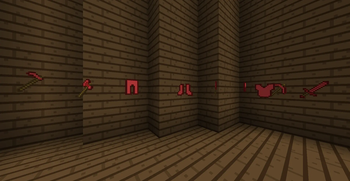
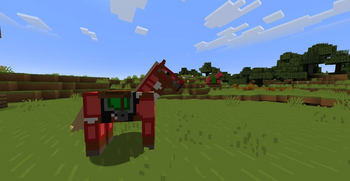
🔴 ArSi's PVP Pack
Welcome to ArSi's PVP Pack! This resource pack blends the clean, minimalist aesthetic of the Bare Bones style with an aggressive, reddish twist to make your gameplay both smoother and more stylish.
🎨 The Aesthetic
ArSi's PVP Pack reduces visual noise by utilizing flat colors and simple textures. The primary focus is a vibrant red color palette that flows through the entire game environment.
- Bare Bones Style: Simplified textures for maximum performance and a sleek "official trailer" look.
- Red Tint: Many textures have been overhauled with a reddish hue to create a competitive, high-energy vibe.
- Performance Optimized: Low-resolution simplicity ensures high FPS, making it perfect for Bedwars, Skywars, or PvP.
🛠️ Installation
- Download the
.zipfile. - Launch Minecraft and navigate to
Options>Resource Packs. - Open the resource pack folder and drop the file inside.
- Activate the pack in the menu.
Note: This pack is inspired by the Bare Bones style. All credits for the original art direction go to the respective creators.
Quick facts
- Edition: Minecraft Java
- File type: .zip (resource pack)
- Minecraft versions listed: 1.20, 1.20.1, 1.20.2
- How to install: Download the .zip resource pack — do not unzip it. → Put it in .minecraft/resourcepacks. → Enable it in Options → Resource Packs.
- Where to get it: Opens on Modrinth — not every file is mirrored on our own servers.
Install steps are the general flow for this file type — How to install Minecraft Java resource packs walks through it step by step.
Verified by MCModsHub
- Downloads as ArSis_PVP_Pack_v1.2.zip
- Download size: 26 KB
- Download link checked 6 Sept 2026 — working
These come from our own check of the pack file, not from the source page.