

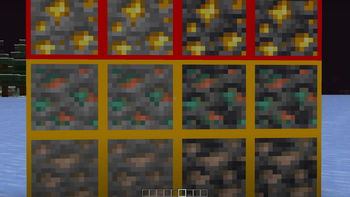
This resource pack replaces the default Minecraft ores with outlined ores.
The goal is to improve visibility while keeping a simple, vanilla-friendly look. The blue color helps the crosshair stand out better in different environments, making it easier to aim and focus.
Features:
- Yellow outlined ores for every ore except for some ores
- Green outline for nether gold and nether quartz
- Red outlined Gold and deepslate gold
Works with vanilla Minecraft. No mods required.
Installation:
- Open your
.minecraftfolder (type%appdata%in the Windows search bar). - Go to the
resourcepacksfolder. - Place the pack inside.
- Enable it in the Resource Packs menu.
Simple, clean, and easy to use. You can check out some of my other resource packs using these links:
https://modrinth.com/resourcepack/red-crosshair
https://modrinth.com/resourcepack/yellow-crosshair
https://modrinth.com/resourcepack/tinycrosshair
Enjoy!
- Edition: Minecraft Java
- File type: .zip (resource pack)
- Minecraft version listed: 26.1
- How to install: Download the .zip resource pack — do not unzip it. → Put it in .minecraft/resourcepacks. → Enable it in Options → Resource Packs.
- Where to get it: Opens on Modrinth — not every file is mirrored on our own servers.
Install steps are the general flow for this file type — How to install Minecraft Java resource packs walks through it step by step.
- Downloads as Bold_ores.zip
- Download size: 16 KB
- Download link checked 14 Sept 2026 — working
These come from our own check of the pack file, not from the source page.