
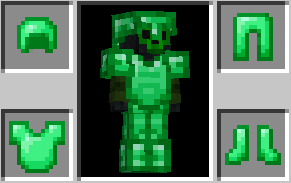
Ever wanted to have emerald armor in your game? Well with this pack u can add emerald armor without having to replace any existing armor textures.
By using commands u can add the emerald armor straight into your game with only a few command blocks
Commands For Armor
Helmet /give @p netherite_helmet[item_model="emerald_helmet",custom_name=[{"text":"Emerald Helmet","italic":false,"color":"green"}],equippable={slot:"head",asset_id:"emerald"}]
Chestplate /give @p netherite_chestplate[item_model="emerald_chestplate",custom_name=[{"text":"Emerald Chestplate","italic":false,"color":"green"}],equippable={slot:"chest",asset_id:"emerald"}]
Leggings /give @p netherite_leggings[item_model="emerald_leggings",custom_name=[{"text":"Emerald Leggins","italic":false,"color":"green"}],equippable={slot:"legs", asset_id:"emerald"}]
Boots /give @p netherite_boots[item_model="emerald_boots",custom_name=[{"text":"Emerald Boots","italic":false,"color":"green"}],equippable={slot:"feet",asset_id:"emerald"}]
- Edition: Minecraft Java
- File type: .zip (resource pack)
- Minecraft version listed: 1.21.11
- How to install: Download the .zip resource pack — do not unzip it. → Put it in .minecraft/resourcepacks. → Enable it in Options → Resource Packs.
- Where to get it: Opens on Modrinth — not every file is mirrored on our own servers.
Install steps are the general flow for this file type — How to install Minecraft Java resource packs walks through it step by step.
- Downloads as Emerald-Armor-Commands.zip
- Download size: 22 KB
- Download link checked 21 Aug 2026 — working
These come from our own check of the pack file, not from the source page.