

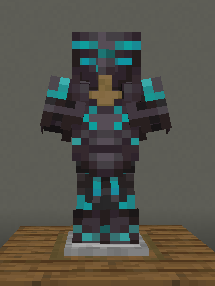
 The resource pack adds a new type of netherite armor to Minecraft, or rather, a new, more pleasant template in blue shades


――――――――――――――――――――――――――――――――――――――――――――――――――――――
Features:
Works on versions before the templates were added.
The template has a blue gradient
To install, place it in the resourcespack folder, then open the resource pack and select it
If you're looking for a texture pack that slightly reworks armor. Nether Templete is the perfect choice for you. It provides a pleasant and clear gaming experience without changing the original Minecraft feel.
- Edition: Minecraft Java
- File type: .zip (resource pack)
- Minecraft versions listed: 1.16, 1.16.1, 1.16.2
- How to install: Download the .zip resource pack — do not unzip it. → Put it in .minecraft/resourcepacks. → Enable it in Options → Resource Packs.
- Where to get it: Opens on Modrinth — not every file is mirrored on our own servers.
Install steps are the general flow for this file type — How to install Minecraft Java resource packs walks through it step by step.
- Downloads as NTOV.zip
- Download size: 8 KB
- Download link checked 23 Aug 2026 — working
These come from our own check of the pack file, not from the source page.