
Universal Font Tester
Java data pack listed for Minecraft 1.16–1.21. Downloads from the MC Java Mods app on Android.
Instantly preview and test any Minecraft font with easy in-game commands — ideal for creators, resource-pack artists, and modpack designers.
⬇ Download on CurseForge

Universal Font Tester
A complete in-game font and text rendering toolkit for Minecraft.







About
Universal Font Tester is a font preview and text rendering toolkit for resource-pack creators, modpack developers, UI designers and anyone working with custom Minecraft fonts.
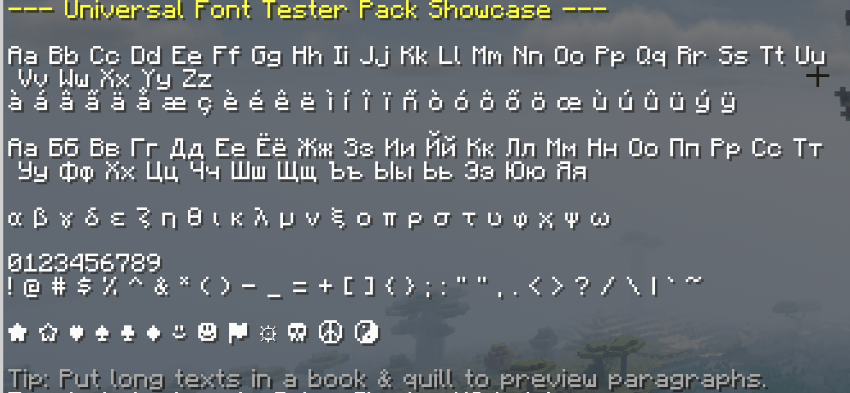
Preview complete character sets directly in-game, compare spacing and readability, and test the same glyphs across multiple Minecraft text contexts without needing external tools.
Highlights
- Preview Basic Latin, numbers and punctuation
- Test extended Latin characters and accents
- Preview Greek and Cyrillic character sets
- Test symbols, arrows and mathematical operators
- Dedicated width and spacing tests
- UI-focused labels, counters, buttons and timer samples
- Display every preview in a single sequence
- Test fonts across multiple Minecraft rendering contexts
- Clickable in-game help menu
- Built-in compatibility diagnostics
- No mods or external dependencies required
Requirements
Minecraft: 1.21 - 1.21.11 & 26.1 - 26.3 Type: Data Pack Dependencies: None
Use the file matching your Minecraft version.
Dedicated v4 packages are available for:
1.21 - 1.21.1 1.21.2 - 1.21.3 1.21.4 1.21.5 1.21.6 1.21.7 - 1.21.8 1.21.9 - 1.21.10 1.21.11 26.1 - 26.1.2 26.2 26.3
Font Tests
Open the main interactive menu with:
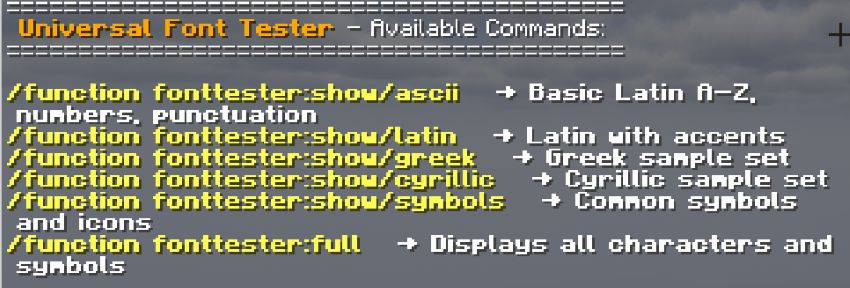
/function fonttester:help
Available previews include:
/function fonttester:show/ascii- Basic Latin, numbers and punctuation/function fonttester:show/latin- Extended Latin characters and accents/function fonttester:show/greek- Greek alphabet and accented characters/function fonttester:show/cyrillic- Cyrillic alphabet and regional characters/function fonttester:show/symbols- Symbols, arrows and operators/function fonttester:show/width_test- Width, spacing and ambiguous character testing/function fonttester:show/ui_test- Buttons, HUD labels, counters and interface text/function fonttester:full- Run every preview in sequence
Context Lab
Universal Font Tester v4 can display the same sample glyphs across several Minecraft text environments.
Use:
/function fonttester:contexts
The context lab tests:
- Chat
- Action bar
- Titles
- Bossbars
- Scoreboard sidebar
- Signs
- Item names
Temporary context displays can be cleared with:
/function fonttester:contexts/clear
This makes it easier to spot differences in spacing, readability, glyph coverage and visual weight between interface contexts.
Diagnostics
Universal Font Tester includes an in-game diagnostic view for checking the installed compatibility profile and active datapack components.
Run:
/function fonttester:diagnostics
This reports the Minecraft compatibility profile packaged with the installed version and verifies the main Universal Font Tester systems.
Installation
Download the package matching your Minecraft version and place the ZIP directly inside your world's datapacks folder.
Run /reload if the world is already running.
Then open the main menu with:
/function fonttester:help
For accurate testing, make sure the resource pack containing your custom font is enabled and has the correct resource-pack priority.
Support the Project
Enjoying Universal Font Tester?
Support future updates and upcoming Our Story projects through Patreon.


For support, suggestions, bug reports or new font testing ideas, join the Our Story community on Discord.
Game Hosting
Need a server for your Minecraft projects?
Host your server with BisectHosting and use code OURSTORY for 25% OFF.

Every purchase helps support the development of Our Story projects.
Created by LevelsFR
CurseForge • Modrinth • Discord • Patreon
- Edition: Minecraft Java
- File type: .jar
- Minecraft versions listed: 1.21, 1.21.1, 1.21.11
- How to install: Install the matching mod loader (Forge, Fabric or NeoForge) for your Minecraft version. → Download the .jar. → Put it in the .minecraft/mods folder and launch that loader profile.
- Where to get it: Opens on CurseForge — not every file is mirrored on our own servers.
Install steps are the general flow for this file type — see the MC Java Mods guides for the full walkthrough.
- Downloads as UniversalFontTester v4 MC26.3.zip
- Download size: 586 KB
- Download link checked 27 Oct 2026 — working
These come from our own check of the pack file, not from the source page.