
Glyph Wordle
Wordle Blocks Play Wordle in Minecraft! This resource pack transforms standard blocks into full English and Russian alphabets, perfect for building word…
⬇ Download on Modrinth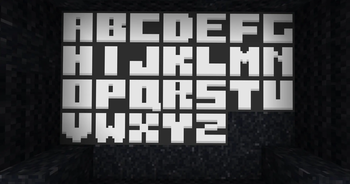

🇺🇸
About the Project: This resourcepack adds high-quality full support for the English (Latin) and Russian (Cyrillic) alphabets to Minecraft, while maintaining a vanilla aesthetic.
Key Features
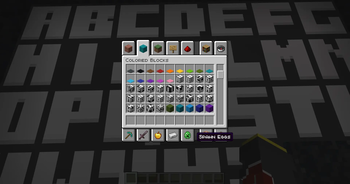
- Block Replacement: This pack replaces terracotta and concrete textures with alphabet letters, allowing you to build words directly in your world.
- Vanilla Style: Designed to blend perfectly with the standard Minecraft look.
- 16x Resolution: Zero performance impact.
How to Use
Download the kit, move it to the "resourcepacks" section and activate it in the game. Place concrete or terracotta blocks of different colors to display certain letters on them.
🇷🇺
О проекте: Этот пакет ресурсов добавляет высококачественную поддержку Английского (Латиница) и Русского (Кириллица) алфавита в Minecraft, сохраняя при этом эстетику "ванилы".
Ключевые особенности
- Замена блоков: В этом наборе текстуры терракоты и бетона заменены буквами алфавита, что позволяет создавать слова прямо в вашем мире.
- Ванильный стиль: Разработан таким образом, чтобы идеально сочетаться со стандартным дизайном Minecraft.
- 16-кратное разрешение: Нулевое влияние на производительность.
Как использовать
Скачайте набор, переместите его в папку "resourcepacks" и активируйте в игре. Расположите бетонные или терракотовые блоки разных цветов так, чтобы на них отображались определенные буквы.
🇺🇸
Planned Updates:
- 🌍 Adding numbers, and symbols.
🇷🇺
В дальнейшем:
- 🌍 Добавление цифр и символов.
🇺🇸
- Found a bug or have a suggestion? Feel free to DM me on Discord: @mutya660. Your feedback is much appreciated!
🇷🇺
- Заметили баг или есть крутая идея? Пишите мне в личные сообщения в Discord: @mutya660. Буду рад обратной связи!
- Edition: Minecraft Java
- File type: .zip (resource pack)
- Minecraft versions listed: 1.13, 1.13.1, 1.13.2
- How to install: Download the .zip resource pack — do not unzip it. → Put it in .minecraft/resourcepacks. → Enable it in Options → Resource Packs.
- Where to get it: Opens on Modrinth — not every file is mirrored on our own servers.
Install steps are the general flow for this file type — How to install Minecraft Java resource packs walks through it step by step.
- Downloads as Latin.zip
- Download size: 11 KB
- Download link checked 6 Sept 2026 — working
These come from our own check of the pack file, not from the source page.