
Nexplex's 64x
My texture pack Nexplexs 64x is a pack where i try to not fully change the texture of minecraft just make it smoother because the original texture are not…
⬇ Download on Modrinth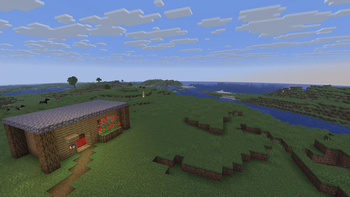
Nexplex's 64
Nexplex 64x is a passion project built for players who love the "Vanilla" look of Minecraft but find the default 16x textures a bit too jagged or pixelated for their liking. My goal isn't to turn Minecraft into a hyper-realistic simulator; it’s simply to take the world you already know and smooth it out.
I started this pack because I noticed that the standard textures can feel a bit "noisy" or rough around the edges. By bumping the resolution up to 64x, I’ve given myself the room to clean up those lines and soften the transitions, making the entire game feel more cohesive and easy on the eyes.
What Makes Nexplex 64x Different? Staying True to the Original: I’m a big believer in the classic Minecraft aesthetic. You won’t find any confusing redesigns here—just the blocks you recognize, looking the way they were meant to look on a modern screen.
Focus on "Smoothness": The "64x" isn't just for show. It allows me to blend colors and sharpen edges so that everything from a single dirt block to a massive mountain range looks clean, crisp, and buttery smooth.
Reduced Visual Fatigue: By removing the grittiness of the original pixels, the world becomes much more comfortable to look at during long building sessions or survival grinds.
In short, Nexplex 64x is about refinement. It’s for the player who wants a more "premium" feel to their game without losing that essential Minecraft charm. It’s the game you love, just with the rough edges sanded down for a better experience.
How to install
- download the texture pack
- Open the launcher
- find the installations tab in the launcher
- Find the folder button on the installation
- click it and it should open the files for minecraft
- find the resource packs folder
- drop the texture pack in the folder
- now open minecraft and turn on the texture pack
Installation video [ NOT MINE ] .
Recommended Resource packs to use with mine
Fresh animations https://modrinth.com/resourcepack/fresh-animations
Fresh Moves https://modrinth.com/resourcepack/fa-player-extension
Bees fancy crops https://modrinth.com/resourcepack/fancy-crops
IMPORTANT None of the videos above are my videos go to the video creators channel and show love :)
- Edition: Minecraft Java
- File type: .zip (resource pack)
- Minecraft version listed: 1.21.11
- How to install: Download the .zip resource pack — do not unzip it. → Put it in .minecraft/resourcepacks. → Enable it in Options → Resource Packs.
- Where to get it: Opens on Modrinth — not every file is mirrored on our own servers.
Install steps are the general flow for this file type — How to install Minecraft Java resource packs walks through it step by step.
- Downloads as Nexplexs 64x.zip
- Download size: 8.0 MB
- Download link checked 22 Aug 2026 — working
These come from our own check of the pack file, not from the source page.