

Missing Skin Default – Minecraft Resource Pack
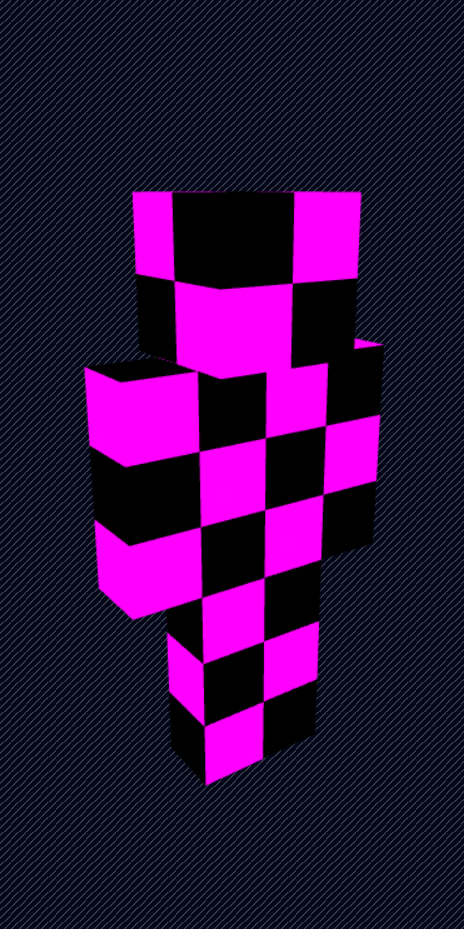
A tiny Minecraft resource pack that replaces the default Steve (wide) and Alex (slim) skins with the iconic missing texture (purple & black) pattern.
Because sometimes the default skins are just… annoying. 😌
📦 What This Pack Does
- Replaces:
- Default wide model skin (Steve)
- Default slim model skin (Alex)
- Uses Minecraft’s classic missing texture look
- Client-side only
- Lightweight & simple
🧠 Why?
Ever log in and see the default skins everywhere?
Yeah.
Now they glow in cursed purple instead.
🛠 Installation
- Download or clone this resource pack.
- Place the folder or
.zipinto: - Open Minecraft → Options → Resource Packs
- Enable the pack.
- Done.
📁 Pack Purpose
This pack only modifies the default player textures — nothing else.
No blocks.
No UI.
No sounds.
Just ✨missing skin energy✨.
⚠ Notes
- Works best when players are shown with fallback/default skins.
- Multiplayer compatible (only affects your client).
- If Mojang changes default skin paths in future versions, this pack may need updating.
🟪⬛ Enjoy the void.
Quick facts
- Edition: Minecraft Java
- File type: .zip (resource pack)
- Minecraft versions listed: 1.21, 1.21.1, 24w33a
- How to install: Download the .zip resource pack — do not unzip it. → Put it in .minecraft/resourcepacks. → Enable it in Options → Resource Packs.
- Where to get it: Opens on Modrinth — not every file is mirrored on our own servers.
Install steps are the general flow for this file type — How to install Minecraft Java resource packs walks through it step by step.
Verified by MCModsHub
- Downloads as DefaultSkinBreaker.zip
- Download size: 30 KB
- Download link checked 20 Aug 2026 — working
These come from our own check of the pack file, not from the source page.