
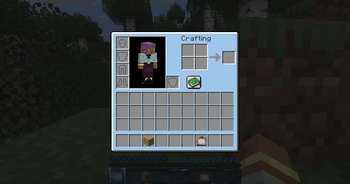
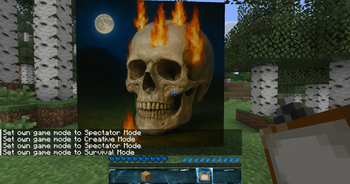
Skillet Blue – A Cooler Way to Play Skillet Blue is the result of countless hours of careful pixel work, crafted to bring a clean, modern, blue‑themed aesthetic to your Minecraft world. Thanks to players like you, this project continues to grow and improve. If you’d like to show a small token of appreciation and support future updates, consider buying me a coffee. Buy me a coffee · Join us on Discord
Why Skillet Blue? Skillet Blue transforms Minecraft’s visuals with a crisp, unified blue palette—without sacrificing the iconic vanilla charm. Every texture is redesigned to feel smoother, clearer, and more atmospheric, giving your world a fresh identity while staying true to the block game you love.
- Refined blue‑themed blocks, items, and UI
- Clean, readable icons and menus
- Enhanced skies, water, and lighting tones
- A cohesive look that feels modern but unmistakably Minecraft
📥 Installation Guide Skillet Blue works with all common Minecraft versions and integrates seamlessly with performance mods like Sodium or Lithium.
- Download the Skillet Blue resource pack.
- Place the .zip file into your resourcepacks folder.
- Launch Minecraft and activate the pack in the Resource Packs menu. If everything worked, your UI and hotbar will immediately shine in the signature Skillet Blue style.
🎛 Configuration No setup required — Skillet Blue is optimized out of the box. For the best experience, you can optionally:
- Enable custom skies (if supported)
- Adjust brightness for deeper or lighter blues
- Combine with shaders for reflections and enhanced lighting
✅ Compatibility Skillet Blue is designed to be:
- Lightweight and performance‑friendly
- Compatible with most modded setups
- Available in multiple resolutions (16x, 32x, …) If you encounter issues, make sure your game and drivers are up to date and check for conflicting packs.
🐛 Reporting Issues Found a missing texture or visual glitch? Please include your Minecraft version, active resource packs, and mods when reporting. Screenshots help a lot.
- Edition: Minecraft Java
- File type: .zip (resource pack)
- Minecraft versions listed: 1.20, 1.20.1, 1.20.2
- How to install: Download the .zip resource pack — do not unzip it. → Put it in .minecraft/resourcepacks. → Enable it in Options → Resource Packs.
- Where to get it: Opens on Modrinth — not every file is mirrored on our own servers.
Install steps are the general flow for this file type — How to install Minecraft Java resource packs walks through it step by step.
- Downloads as skilletv-1.0.0-resourcepack-1.21.8.zip
- Download size: 11.8 MB
- Download link checked 22 Aug 2026 — working
These come from our own check of the pack file, not from the source page.