
Cinematic Horizon Shaders
A cinematic Minecraft shader pack featuring realistic volumetric clouds, reflective water, wet and shiny blocks, enhanced lighting, and…
⬇ Download on Modrinth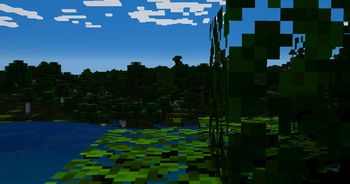
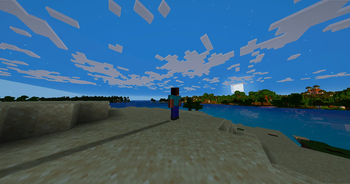
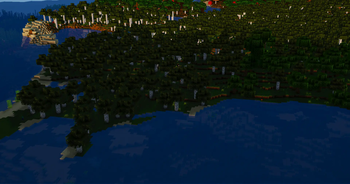
Cinematic Horizon Shaders
Cinematic Horizon Shaders is a cinematic realism shader pack for Minecraft Java Edition, built around a lightweight custom rendering pipeline with enhanced water, volumetric clouds, realistic lighting, reflective materials, and configurable performance profiles.
The pack is designed to provide a dramatic, high-quality appearance while remaining practical for gameplay, recording, and livestreaming.
Features
Wet and Shiny Block Reflections
Reflective lighting has been added to materials that should appear polished, metallic, icy, or wet.
Supported surfaces include:
- Iron, gold, copper, and netherite blocks
- Diamond, emerald, lapis, and amethyst blocks
- Quartz and polished stone
- Glazed terracotta
- Ice, packed ice, and blue ice
Enhanced Light Sources
Light-emitting blocks appear brighter and more atmospheric, including:
- Torches and soul torches
- Lanterns and soul lanterns
- Froglights
- Glowstone and shroomlights
- Sea lanterns
- Redstone lamps
- Campfires and fire
- End rods
- Beacons
- Candles
Regular level-14 light sources are designed to remain visible for approximately five blocks, while level-15 sources can reach approximately six blocks.
Improved Lighting
- Dynamic sunlight and shadows
- Coloured sunrise and sunset lighting
- Ambient occlusion
- Moving foliage
- Rain-dependent lighting
- Reflective sunlight on polished surfaces
- Restrained cinematic bloom
- Natural colour grading and exposure
Performance Profiles
Performance
Designed for higher frame rates.
- Reduced cloud sample count
- Lower shadow quality
- Reduced reflection distance
- Lower ambient occlusion
- Simplified water waves
Balanced
Recommended for normal gameplay and recording.
- Medium cloud quality
- Moderate reflections
- Moving cloud shadows
- Detailed water
- Balanced lighting quality and performance
Cinematic
Designed for screenshots, trailers, and powerful systems.
- High-quality volumetric clouds
- Higher-quality water reflections
- Stronger wet and polished-material reflections
- Maximum shadow quality
- Enhanced ambient occlusion and lighting detail
Recommended Hardware
The Balanced profile is intended for modern dedicated graphics cards.
The Cinematic profile is best suited to higher-performance GPUs, especially when playing at 1440p or higher resolutions.
Performance will vary depending on:
- Render distance
- Shadow distance
- Minecraft resolution
- Cloud quality
- Water reflection quality
- Resource-pack resolution
- Installed mods
Requirements
- Minecraft Java Edition
- Iris Shaders
- A compatible Fabric installation
Sodium is recommended for improved performance.
Installation
Install Fabric, Iris, and Sodium.
Download the shader ZIP.
Place the ZIP directly into:
.minecraft/shaderpacksDo not extract the shader ZIP.
Start Minecraft.
Open:
Options → Video Settings → Shader Packs
Select Cinematic Horizon Shaders.
Begin with the Balanced profile.
When replacing an older version, remove or disable the previous ZIP and fully restart Minecraft.
Configuration
The shader settings menu includes controls for:
- Water quality
- Water reflection quality
- Water reflection strength
- Wave strength
- Wet block reflections
- Dry material shine
- Cloud quality
- Cloud coverage
- Cloud density
- Cloud speed
- Cloud height
- Cloud thickness
- Cloud-shadow strength
- Emissive lighting
- Light radius
- Exposure
- Saturation
- Ambient occlusion
- Bloom
Credits
Cinematic Horizon Shaders uses its own compact shader structure and visual direction.
Selected rendering techniques and the included cloud-water noise asset were adapted from the user-supplied Complementary Unbound shader archive by Complementary Development.
This is an independent shader project and is not an official Complementary release.
The applicable Complementary licence and attribution information are included inside the shader archive.
Important Notice
Do not redistribute this shader pack without preserving all included credits, attribution files, and licences.
Before publishing a modified shader pack, confirm that all included assets and adapted code may be redistributed under their respective licence terms.
- Edition: Minecraft Java
- File type: .zip (resource pack)
- Minecraft versions listed: 1.20, 1.20.1-rc1, 1.20.1
- How to install: Download the .zip resource pack — do not unzip it. → Put it in .minecraft/resourcepacks. → Enable it in Options → Resource Packs.
- Where to get it: Opens on Modrinth — not every file is mirrored on our own servers.
Install steps are the general flow for this file type — see the MC Java Mods guides for the full walkthrough.
- Downloads as Cinematic Horizon Shaders.zip
- Download size: 18 KB
- Download link checked 9 Sept 2026 — working
These come from our own check of the pack file, not from the source page.