
Brutes Drop Scraps
I don't know my version or loader
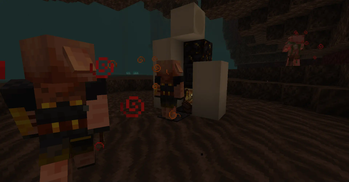
Piglin Brutes have a chance of dropping Netherite Scraps.
How to change drop rate in 1.20.4 and olderOpen the datapack, then go data/minecraft/loot_tables/entities and open the piglin_brute json file. This is what's written in the json file:
{
  "type": "minecraft:entity",
  "pools": [
    {
      "bonus_rolls": 0.0,
      "entries": [
        {
          "type": "minecraft:item",
          "functions": [
            {
              "add": false,
              "count": {
                "type": "minecraft:uniform",
                "max": 1,
                "min": 0
              },
              "function": "minecraft:set_count"
            },
            {
              "count": {
                "type": "minecraft:uniform",
                "max": 0.2,
                "min": 0
              },
              "function": "minecraft:looting_enchant"
            }
          ],
          "name": "minecraft:netherite_scrap"
        }
      ],
      "rolls": 1.0
    }
  ]
}
Above the "function": "minecraft:set_count" is the normal drop rate without the Looting enchantment. While above the "function": "minecraft:looting_enchant" is the drop rate with the Looting enchantment.
"max" dictates the maximum drop rate of Scraps dropped by Brutes, while the "min" dictates the minimum drop rate of Scraps dropped by Brutes. To change the drop rate, you just have to change the number to an higher or lower number.
For example... changing "max": 1 to "max": 1.1 or higher increases the maximum drop rate, while changing it to "max": 0.9 or lower decreases the maximum drop rate. "min" works the same, but for the minimum drop rate.
- Edition: Minecraft Java
- File type: .jar
- Minecraft versions listed: 1.16.2, 1.16.3, 1.16.4
- How to install: Install the matching mod loader (Forge, Fabric or NeoForge) for your Minecraft version. → Download the .jar. → Put it in the .minecraft/mods folder and launch that loader profile.
- Where to get it: Opens on Modrinth — not every file is mirrored on our own servers.
Install steps are the general flow for this file type — see the MC Java Mods guides for the full walkthrough.
- Downloads as BrutesDropScraps-1.1.zip
- Download size: 61 KB
- Download link checked 28 Aug 2026 — working
These come from our own check of the pack file, not from the source page.