
Infinite Storage Bundle
I don't know my version or loader
Infinity Bundle Mod/Datapack





Overview
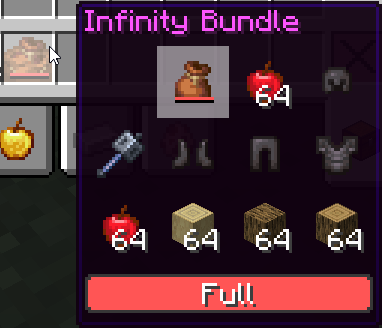
The Infinity Bundle Mod/Datapack is a revolutionary Minecraft storage solution that allows players to store bundles inside bundles, offering an infinite approach to item storage. Say goodbye to cluttered chests and hello to seamless, compact storage, all packed into a single item.
Features
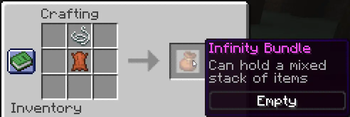
- Infinity Storage: Craft the Infinity Bundle using 1 Leather and 1 String. This unique bundle allows you to store bundles within other bundles, providing a virtually limitless storage solution.
- Note: storing an excessive number of items may cause significant lag.
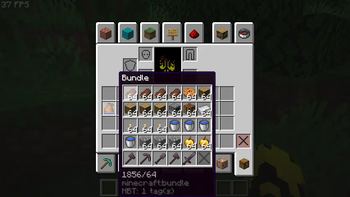
- Unlimited Capacity: Store an infinite number of items in a single bundle, enabling effortless organization.
- Retrieve Stored Items:
- In Inventory: Right-click the bundle to retrieve the most recent item stored.
- Pre-1.21.2: Right-click the bundle from the hotbar to eject all stored items at once.
- 1.21.2 and Beyond: Right-click the bundle from the hotbar to retrieve only the most recent item stored.
- Scroll Functionality (1.21.2+): Use the mouse wheel to scroll through the contents of the bundle and select a specific item from up to 10 displayed items.
- Effortless Usage: Simply throw the Infinity Bundle on the ground and toss in any items you wish to store.
- Compact Design: Minimize clutter and streamline inventory management by nesting multiple bundles within a single Infinity Bundle.
- Seamless Integration: Compatible with both single-player and multiplayer environments, this mod/datapack integrates smoothly into your Minecraft world without disrupting gameplay.
Installation
For Mod Installation
- Download the Mod: CurseForge | Modrinth
- Install with Your Preferred Mod Loader:
- Forge/NeoForge: Drag the mod file into the
modsfolder located in your.minecraftdirectory. - Fabric/Quilt: Ensure you have the Fabric API installed alongside the corresponding mod loader. Place the mod file into the
modsfolder.
- Forge/NeoForge: Drag the mod file into the
For Datapack Installation
- Download the Datapack: CurseForge | Modrinth
- Locate Your Minecraft Saves Folder:
- Windows:
%appdata%\.minecraft\saves - Mac:
~/Library/Application Support/minecraft/saves - Linux:
~/.minecraft/saves
- Windows:
- Add the Datapack:
- Open the folder of the world you want to add the datapack to.
- Drag and drop the downloaded
.zipfile into thedatapacksfolder.
- Load the Datapack:
- Start Minecraft and enter your world.
- Use the
/reloadcommand if necessary. - Enjoy infinite storage with the Infinity Bundle!
Compatibility
- Minecraft Version: Compatible with Minecraft version 1.17+.
- Mod Loaders: Supports Forge, NeoForge, Fabric (with Fabric API), and Quilt (with Fabric API).
- Multiplayer Support: Fully compatible with multiplayer servers.
Usage
- Storing Items: Throw your Infinity Bundle on the ground and throw items or other bundles into it for storage.
- Retrieving Items: Right-click the bundle inside your inventory to retrieve items. For versions 1.21.2 and later, use the scroll wheel to cycle through up to 10 items in the bundle.
- Stacking Bundles: Take advantage of the ability to store bundles within other bundles to manage massive inventories in a compact space.
Feedback and Support
If you encounter any issues or have suggestions for improvements, please contact us via Discord.
License
This mod/datapack is licensed under All Rights Reserved. You are free to use it for personal enjoyment and incorporate it into modpacks. Modifications for personal use are allowed. Redistribution and reuploading are strictly prohibited. Sharing is permitted only through official links.
Credits
- Creator: sashiro
Links
- Download the Mod/Datapack: CurseForge MOD | CurseForge DATAPACK | Modrinth
- Join our Community: Discord
- Support the Creator: PayPal
Thank you for using the Infinity Bundle Mod/Datapack! Enjoy a cleaner, more organized Minecraft experience.
- Edition: Minecraft Java
- File type: .jar
- Minecraft versions listed: 1.21.5, 1.21.6, 1.21.7
- How to install: Install the matching mod loader (Forge, Fabric or NeoForge) for your Minecraft version. → Download the .jar. → Put it in the .minecraft/mods folder and launch that loader profile.
- Where to get it: Opens on Modrinth — not every file is mirrored on our own servers.
Install steps are the general flow for this file type — see the MC Java Mods guides for the full walkthrough.
- Downloads as InfiniteStorageBundle-v11.zip
- Download size: 5 KB
- Download link checked 28 Aug 2026 — working
These come from our own check of the pack file, not from the source page.