DatapacksJava
Update 1.21 without trial chambers
Enables the crafter, copper and tuff blocks, without the trial chambers and breeze. Made for Hermitcraft season 10!
I don't know my version or loader
Open the Minecraft launcher and look at the profile you play on — it names both, like fabric-loader-1.21.4. The version also shows in the bottom-right corner of the game's main menu.
No loader in the profile name? Then it's plain Minecraft, and these mods won't run — you need Fabric or NeoForge installed first.
Update 1.21 without trial chambers
Enables the Update 1.21 experimental features, but disables the trial chambers and breeze. Notably, in 1.20.5+ the new raid mechanics will also be enabled, with pillagers dropping ominous bottles instead of giving bad omen.
| Enabled | Disabled |
 Crafter Crafter
  Copper bulb Copper bulb
  Copper blocks Copper blocks
   Tuff blocks Tuff blocks
 New raid mechanics New raid mechanics
|
 Trial chambers Trial chambers
  Trial spawner and vault Trial spawner and vault
 Heavy core Heavy core
 Breeze Breeze
 Bogged Bogged
 Trial key Trial key
 Wind charge Wind charge
|
|---|
Data pack instructions
After installation, DON'T enable the separate "update_1_21 (feature)" data pack!
Adding to a new singleplayer world- Open the "Data Packs" selection screen when creating a new world

- Drag the downloaded datapack zip file onto the game window
- Move data pack to the "Selected" column and click "Done"
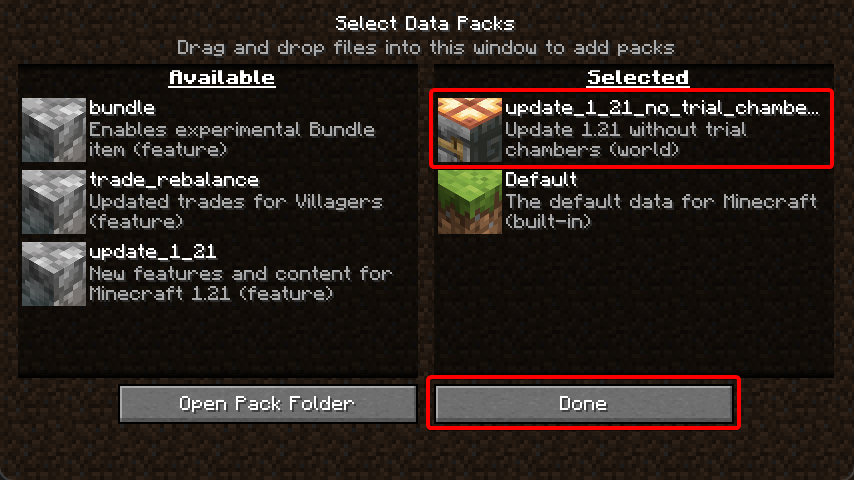
- Accept the "Experimental Features Warning"

- Change any other world settings and click "Create New World"

- Select your world and click "Edit"
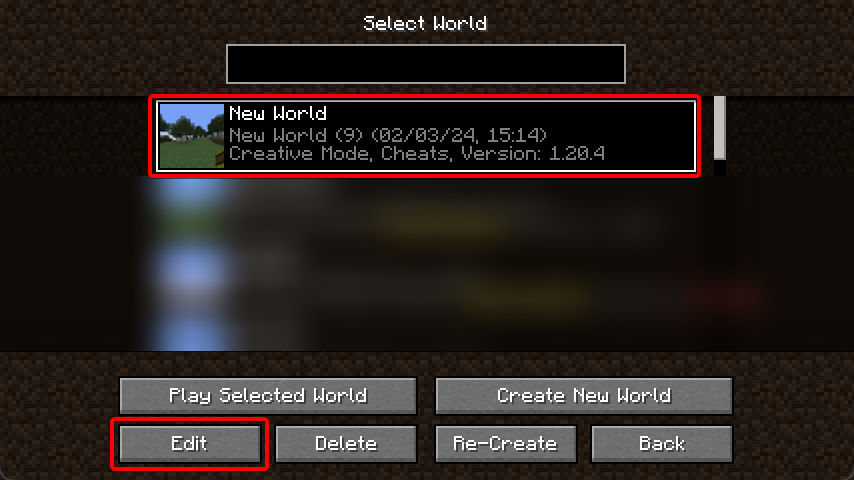
- Click "Open World Folder"
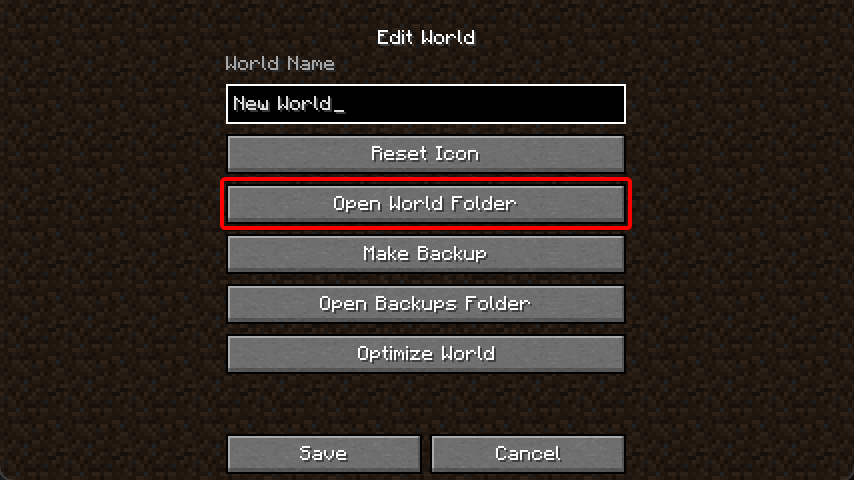
- Enable the "Update 1.21" feature flag
level.dat. A simple way to do this is by installing the NBT Viewer extension for VSCode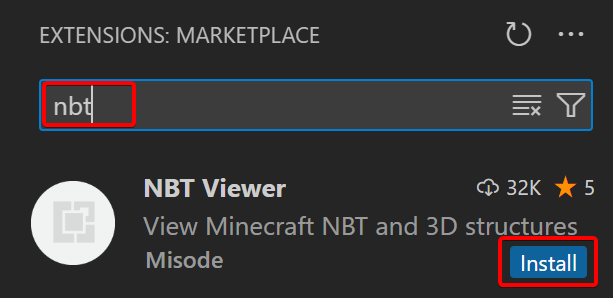
- Open the
level.datfile in VSCode by dragging the file from the file explorer to the VSCode window - Inside
Data, add a new list tag calledenabled_features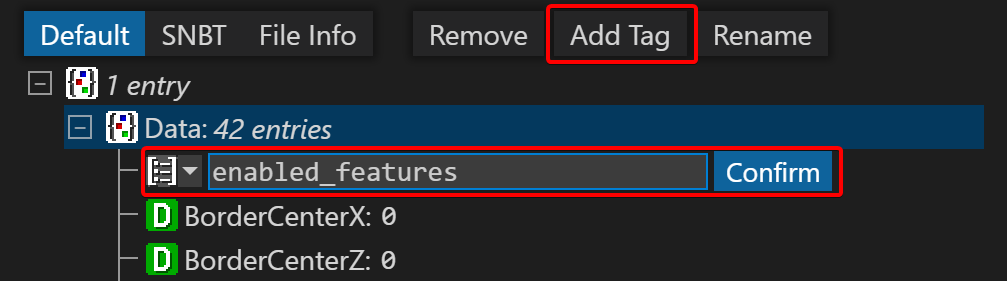
- Inside this list, add two new string tags with
minecraft:vanillaandminecraft:update_1_21. Select the yellow string icon when adding the first tag.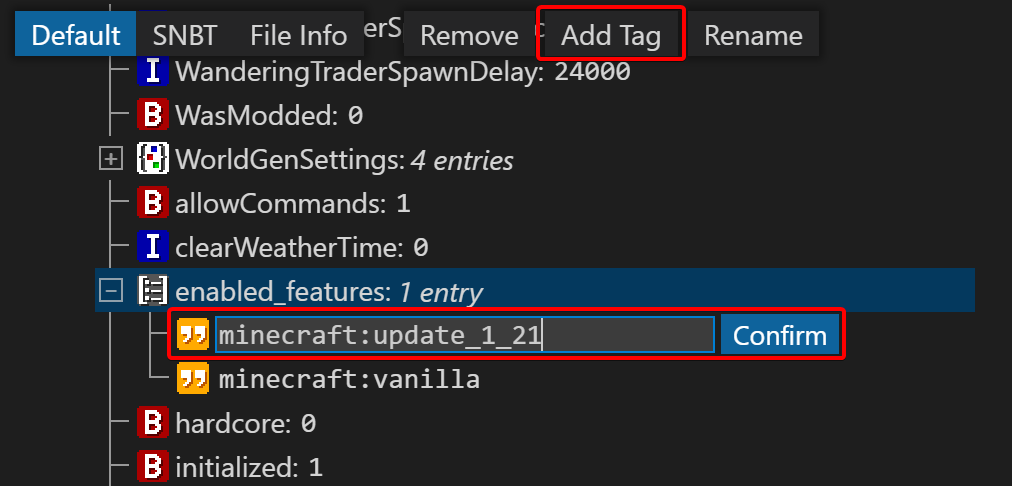
- Press
Ctrl + Sto save the file, make sure the world is not open in-game when editing the file! - In the world save folder, find the
datapacksfolder and put the downloaded zip file in there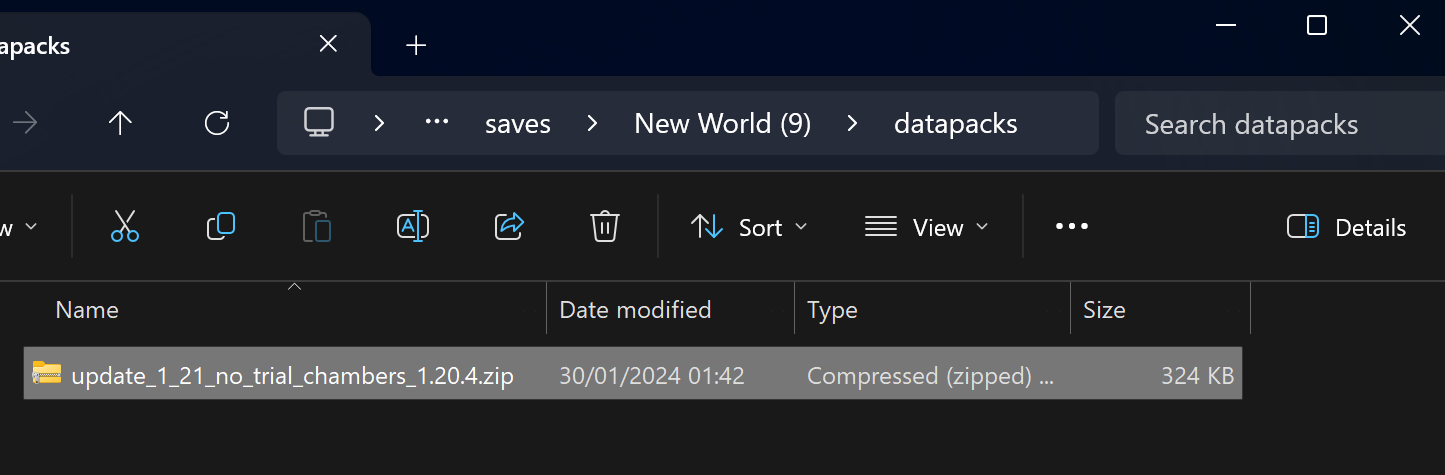
- You can now open the world!
- Download the server jar from the bottom of the 1.20.4 article
- Place the
server.jarfile in the server folder - Inside this same folder, create the folders
world/datapacks/ - Put the downloaded zip file in there
- Run the server jar for the first time
java -Xmx1024M -Xms1024M -jar server.jar nogui
- Agree to the EULA by editing
eula.txt - Run the server jar again. You should see
Found new data pack file/update_1_21_no_trial_chambers_1.20.4.zip, loading it automaticallyin the log.
- Shut down the server
- Modify the
world/level.datfile following the same instructions from "Adding to an existing singleplayer world" - Add the downloaded zip file to the
world/datapacks/folder - Restart the server
Quick facts
- Edition: Minecraft Java
- File type: .jar
- Minecraft versions listed: 1.20.5, 1.20.6
- How to install: Install the matching mod loader (Forge, Fabric or NeoForge) for your Minecraft version. → Download the .jar. → Put it in the .minecraft/mods folder and launch that loader profile.
- Where to get it: Opens on Modrinth — not every file is mirrored on our own servers.
Install steps are the general flow for this file type — see the MC Java Mods guides for the full walkthrough.
Verified by MCModsHub
- Downloads as update_1_21_no_trial_chambers_1.20.6.zip
- Download size: 140 KB
- Download link checked 28 Aug 2026 — working
These come from our own check of the pack file, not from the source page.