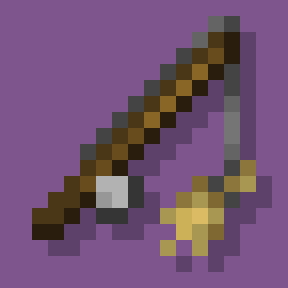
Mount & Ride
Mount and ride more mobs in survival. Free Minecraft Java datapack for 1.20, 1.20.1, 1.20.2.
I don't know my version or loader


⚠️ Resource Pack Required
Have you always wanted to ride other mobs?
Well, with this data pack you can do it!
Features
- Fast riding system.
- Added 9 riding sticks:
 Amethyst Shard on a Stick.
 Bamboo on a Stick.
 Fish on a Stick.
 Iron on a Stick.
 Meat on a Stick.
 Seagrass on a Stick.
 Seeds on a Stick.
 Snowball on a Stick.
 Wheat on a Stick.
- 3 new advancements:
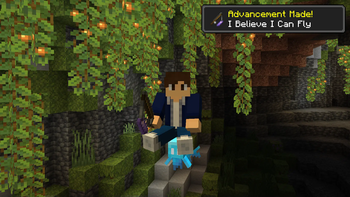
- "I Believe I Can Fly", obtained by riding a Allay.
- "Tank Time!", obtained by riding a Iron Golem.
- "Better Than a Knight", obtained by mounting every rideable mob.
- Support for 4 languages:
- English
- Español
- Français
- Português
How to Install
Data Pack:
- Click the "DP & RP" featured version.
- Scroll down and Download the Primary file.
- If you want to create a World, go to Singleplayer > Create New World > Data Packs > Open Pack Folder.
- If you want to put it in an already existing world, go to Singleplayer > Select World > Edit > Open World Folder > datapacks.
- Copy/Cut and Paste the file downloaded there.
- Open/Create your world (if necessary, run "/reload" in the chat).
Required Resource Pack:
- Click the "DP & RP" featured version.
- Scroll down and Download the Required Resource Pack.
- Open Minecraft and go to Options > Resource Packs > Open Pack Folder.
- Copy/Cut and Paste the file downloaded there.
- Active the Resource Pack.
Mod (DP & RP Packaged):
- Download the "Mod" featured version.
- Make sure that you installed Forge, Fabric or Quilt for 1.20+
- Press Win + R and search for "%AppData%".
- Go to .minecraft > mods.
- Copy/Cut and Paste the file downloaded there.
- Run the Mod-Loader that you use.
Mounting
You can mount a mob by dropping a saddle on it. However, you cannot mount hostile or weak mobs on survival mode (such as silverfishes and frogs).
Riding
To ride a mob, you need a riding stick first. There are 9 different sticks that you can use:
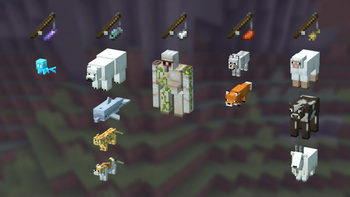
- Amethyst Shard on a Stick. (Allay)
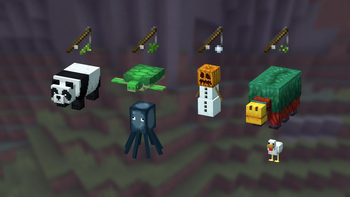
- Bamboo on a Stick. (Panda)
- Fish on a Stick. (Polar Bear, Dolphin, Cat, and Ocelot)
- Iron on a Stick. (Iron Golem)
- Meat on a Stick. (Wolf, and Fox)
- Seagrass on a Stick. (Turtle, Squid, and Glow Squid)
- Seeds on a Stick. (Sniffer, and Chicken)
- Snowball on a Stick. (Snow Golem)
- Wheat on a Stick. (Goat, Sheep, Cow, and Mooshrom)
The mobs also have different speeds depending on their size. It can be increased by right-clicking with the stick.
| Type | Normal Speed (m/s) |
Maximum Speed (m/s) |
|---|---|---|
| Small (like Wolfs) | 6 | 8.5 |
| Medium (like Goats) | 7 | 9.5 |
| Big (like Pandas) | 5.5 | 8 |
Crafting
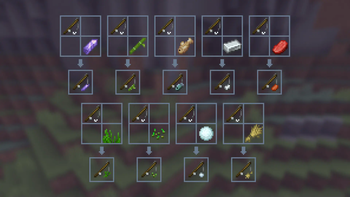
To craft a riding stick, you just need to put a Fishing Rod and the item (Amethyst Shard, Bamboo, Fish...) on a Crafting Table.
Note: It will appear a Knowledge Book has the recipe result, but, once you click it, you get the correct stick.

Advancements
This data pack also adds 3 advancements:
- "I Believe I Can Fly", that can be obtained by riding an Allay with a Amethyst Shard on a Stick.
- "Tank Time!", that can be obtained by riding an Iron Golem with a Iron Ingot on a Stick.
- "Better Than a Knight", that can be obtained by mounting every rideable mob
Can I make a post/video about it on social medias?
Yes, if you give me the credits including a direct link to this page. Please do not distribute modified versions.
Why aren't the custom items appearing in the creative menu?
Unfortunately, data packs cannot add modified items to the creative menu. However, you can always get them by using the command "/function tooltrims:custom_items".
Enjoy! :)
- Downloads as mount-ride-DP-v1-2-1a.zip
- Download size: 36 KB
- Download link checked 28 Aug 2026 — working
These come from our own check of the pack file, not from the source page.